Today, educational app development has grown far beyond being simply classroom support tools – now, it is the driving force that powers entire learning ecosystems. Today’s users are used to – and have come to expect – an intuitive, personalized experience that goes well beyond simply accessing content.
According to Business Research Insights, the global EdTech market was valued at about USD 194 billion in 2024 – and is projected to reach as much as USD 1.063 trillion by 2033, growing at a CAGR of around 20-21%. This explosive growth underscores one thing: simply adding AI or mobile access isn’t enough. To succeed, your app needs to solve real learning challenges now and in the future.
In this guide, we’ll help you build an educational app for iOS and Android that stands out. As an EdTech software development company, we know how to take you from spotting key trends and designing core features to choosing the right tech stack and development approach.
EdTech development can be challenging, but not with CHI Software's competent team!
Another intriguing stats reveal that the market for AR and VR in education is projected to grow at a 25% CAGR between 2024 and 2032.
The EdTech market is diverse and includes six app types, with different purposes ranging from primary education to exam preparation tools and accessibility solutions for students with different needs.
The sky is the limit when it comes to EdTech app features, but it’s always a good idea to start creating an educational app with an MVP and see the first results. No matter your needs, CHI Software is a capable partner for meeting your goals.
EdTech Market Overview
The EdTech landscape is no longer niche – it’s mainstream, fast-moving, and highly competitive. Platforms can serve every stage of learning: from early childhood to corporate upskilling.
What’s driving this momentum?
AI personalization: Learners expect content that adapts to their pace, style, and goals.
Remote-first habits: Hybrid work and education models have made online learning not just acceptable, but preferable.
Global reach: Apps now compete across borders, demanding localization and scalable infrastructure.
For companies investing in education app development, two fast-growing segments stand out: mobile learning and learning management systems (LMS).
Mobile-first solutions are leading the adoption, especially among Gen Z and adult learners who usually need to balance study with work or caregiving. The Business Research company notes that the mobile learning market was valued at USD 86.4 billion in 2024 and is expected to exceed USD 110.4 billion by 2025, with long-term projections indicating USD 340.9 billion by 2029.
The global market of educational software is projected to grow three times between 2025 and 2029.
At the same time, platforms are scaling up through deeper integration with institutional ecosystems. The LMS market, foundational for schools, universities, and enterprise learning, is projected to grow from USD 28.6 billion in 2025 to USD 70.8 billion by 2030, expanding at nearly 20% CAGR, according to Grand View Research.
These shifts highlight why offering content alone is no longer enough. If you want to know how to create a learning app that meets today’s expectations, your product must support personalization, analytics, and adaptability at scale.
EdTech Trends to Watch
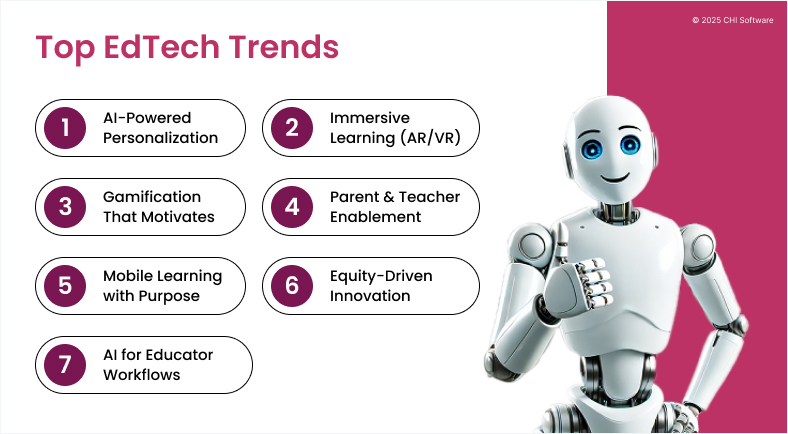
To build an EdTech platform that stands out, it’s essential to understand the trends reshaping how users learn and what they expect from modern platforms.
Consider these trends if you plan to create your own educational app.
Across multiple studies, students using AI-powered platforms achieved up to 19% higher test scores and mastered complex topics 31% faster.
AI Chatbots for E-Learning & Why They Matter
Read more
2. Immersive Learning (AR/VR)
According to SNS Insider, the AR/VR in education market is booming – expected to grow from roughly USD 4.7 billion in 2024 to over USD 28 billion by 2032, with a CAGR of more than 25%. These statistics show that immersive experiences are increasingly expected in a customized education app, especially in STEM, vocational training, and simulations.
3. Gamification That Motivates
Gamification remains one of the most effective tools for boosting student engagement. According to academic research, gamified environments intrinsically support motivation, encourage active learning, and foster positive emotional experiences.
Points, challenges, and progression systems promote a sense of achievement and sustained attention, primarily when integrated with adaptive content and storytelling.
4. Parent & Teacher Empowerment
Even as digital learning continues to grow increasingly complex, parents and teachers play a critical role in guiding students – especially in hybrid and K-12 environments. As part of the modernization of digital learning solutions, platforms are evolving to better support not only learners, but also the adults involved in their education.
Features that support goal tracking, assignment visibility, and two-way feedback help build trust between platforms and the adults who shape a child’s learning environment. The European Commission’s Digital Education Action Plan reinforces this shift, calling for custom EdTech apps that empower educators and caregivers alongside learners.
Want to be a part of the promising EdTech market? Let’s discuss where you should start.
Contact us
5. Mobile Learning with Purpose
A 2023 study found that students using mobile-based learning tools reported higher satisfaction, more positive attitudes toward learning, and an increased sense of autonomy and control over the learning process. These effects are strongest when mobile content is designed intentionally to be short, focused, interactive, and aligned with learning goals.
6. Equity‑Driven Innovation
Adaptive interfaces, voice technology, and multimodal content are expanding access to educational software, especially for learners with disabilities or non-traditional needs.
At a policy level, theOECD has identified AI-enabled equity as both a massive opportunity and a design risk, stressing the importance of responsible implementation that avoids bias and exclusion.
7. AI for Educator Workflows
AI is increasingly viewed as a tool to reduce educator overload. A recent Gallup/Walton Family Foundation survey revealed that 60% of U.S. K–12 teachers used AI tools in 2024.
Other studies confirm these gains, noting that teachers report faster feedback cycles and greater ability to individualize content without sacrificing prep time, according to MIT Sloan EdTech.
These benefits have made AI-driven features a top priority in EdTech app development, particularly for products targeting classroom efficiency and personalized instruction.
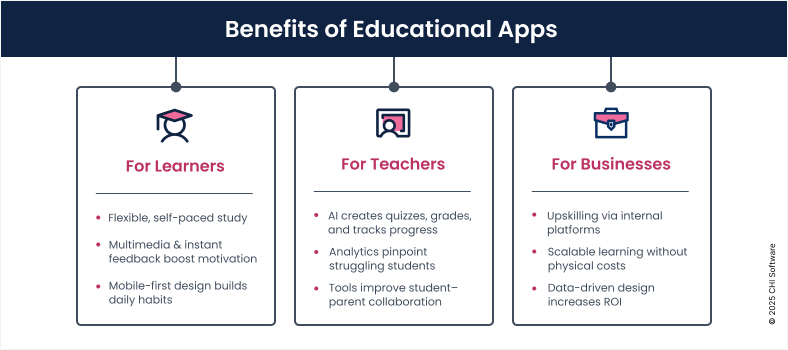
Building an educational app affects not only how people learn, but also how teachers teach and how businesses grow.
Modern custom EdTech apps can benefit learners, educators, and stakeholders in many ways.
Benefitsfor Learners
Learning becomes more flexible and self-paced.
Access to multimedia, interactivity, and real-time feedback can improve motivation.
Mobile-first experiences lower entry barriers and support daily habit-building.
Benefits for Teachers
AI tools reduce manual workload by generating quizzes, grading, and tracking progress.
Dashboards and analytics help identify struggling students and tailor instruction to meet their needs.
Effective communication tools increase collaboration between students and parents.
Benefits for Business Stakeholders
Internal learning platforms improve upskilling and knowledge retention.
Digital education scales without recurring physical costs.
Data-driven design improves ROI over time.
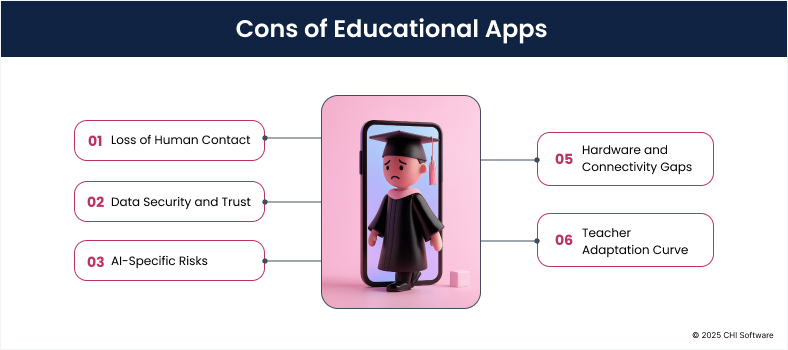
Cons of Educational Apps
A single EdTech application can open up incredible possibilities – but it’s not always smooth sailing. Here’s what to keep in mind as you plan, build, and scale your product.
There are not only benefits – you should also keep these challenges in mind before building an educational app.
Loss of Human Contact
Fully digital platforms can never replicate the nuance of live mentorship or classroom dynamics. Social isolation remains a concern, particularly for younger learners.
Data Security and Trust
A custom EdTech app often collects sensitive data, including academic records, personal identifiers, and even behavioral analytics. Strong encryption and transparent data policies are non-negotiable in today’s day and age.
AI-Specific Risks
Poorly implemented AI can generate misleading or biased content. Hallucinations, outdated training data, or one-size-fits-all logic can compromise both the quality of learning and institutional credibility.
In regions with limited access to quality devices or internet connectivity, learning experiences remain uneven across different groups of users. Even within developed countries, battery drain, app size, and platform compatibility can impact engagement.
Teacher Adaptation Curve
Introducing EdTech often requires teachers to learn new tools, adjust their instruction styles, and manage hybrid workflows on top of their existing responsibilities.
Every product comes with trade-offs, but the right format can set your idea up for success. Below are the most popular areas to explore when you are planning to make a study app, based on real learner needs and market trends.
Types of Educational Apps with Examples
Understanding the core use case behind your app helps define what users expect and how to prioritize features. Below are six distinct categories that dominate the EdTech space.
1. Online Course Platforms
Course-based apps deliver structured learning experiences that combine video, quizzes, and progress tracking. Users often expect course certification, learner dashboards, and mobile optimization.
Popular among language learners and exam takers, these apps rely on spaced out repetition and active recall tests to support long-term retention, often making use of flashcards, custom decks, and visual mnemonics. Strong UX, offline functionality, and performance analytics define this category.
Focused on standardized or competitive tests, these apps help learners manage revision, simulate real testing environments, and analyze performance. Timers, question banks, adaptive difficulty, and instant feedback form the core set of features.
AI can further refine recommendations and highlight knowledge gaps, which is essential if you plan to create an education app that supports meaningful exam preparation.
Bite-sized, curated content creates daily learning habits across diverse subject areas. Users want to have quick access to articles, visuals, or quizzes, typically organized by interest or skill area. Personalization engines, scroll-based interfaces, and low-friction navigation are central to retention here.
Interactive learning experiences for younger audiences can combine voice guidance, game mechanics, and tactile design to support educational goals including basic math, reading, language, or creativity. The strongest apps in this category include parent-facing features and can reliably function offline.
This category addresses learners with disabilities, communication needs, or neurodivergence. Interfaces prioritize clarity, support augmentative and alternative communication (AAC), and often feature integration with adaptive content pathways. Teams creating educational apps for this audience benefit from thoughtful use of AI that enhances – rather than replaces – human input and support.
Share your education app idea with our business analysis team
Contact us
Educational App Monetization Strategies
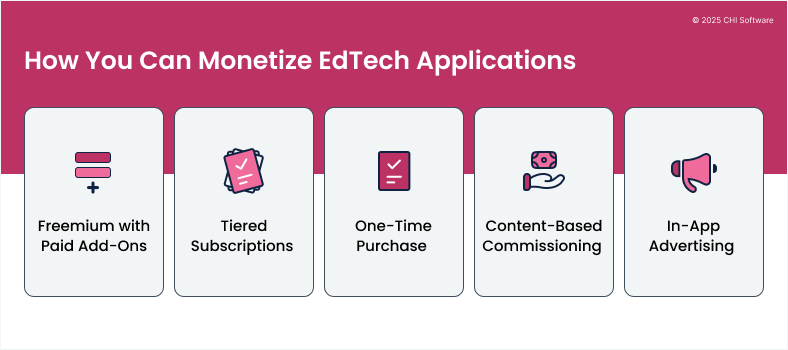
Developing an educational app is only one part of the equation. Defining how it generates revenue is just as critical, particularly if your product is targeted toward long-term engagement or scale. Below are the most common and sustainable monetization models in EdTech today.
Here’s an overview of popular monetization strategies for educational software, from freemium to in-app advertising models.
1. Freemium with Paid Add-Ons
Using ads, you can offer core functionality for free, with optional upgrades such as advanced analytics, exclusive content, or offline access. This model lowers entry barriers and encourages trial, but works best when the upgrade path is clear and value-driven.
2. Tiered Subscriptions
Subscriptions remain the most popular model for those who create educational apps. Many platforms offer multiple tiers like free, standard, and premium to accommodate different levels of access, personalization, or instructor support.
3. One-Time Purchase
Some apps employ a pay-once approach, especially when offering a comprehensive course, exam module, or offline package. A trial version can reduce hesitation before purchase.
4. Content-Based Commissioning
Platforms that host user-generated content, such as courses or tutoring, often charge a percentage per sale or enrollment. Commission models work best when creators receive clear value in return, such as tools, reach, or analytics. For businesses looking to create an app for teaching, this model supports scalability while empowering educators to monetize their expertise.
5. In-App Advertising
Using ads in your app can help subsidize free access, but only when handled carefully. For apps targeting children or students, you’ll need to ensure compliance with COPPA and other relevant policies. Contextual ads and user-controlled preferences further improve user retention.
Must-Have & Advanced Features for Educational Apps
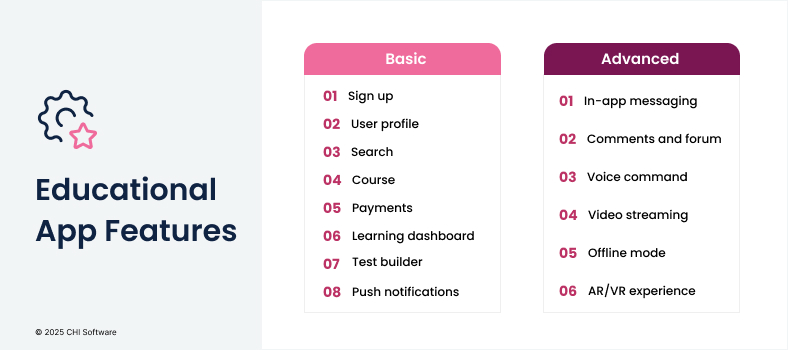
Here you’ll find a fundamental list of features to develop an educational app. Basic functionality refers to your MVP development, while a combination of advanced features creates a unique portrait of your application.
Focus on the basic features first when planning educational app development.
Basic Features
Sign up: It is the very beginning of the user journey, so you should make it as simple as possible. It all starts with an email and a password, plus signing up using social media platforms like Facebook, Google, Apple, and others.
User profile (dashboard): It’s one section where users can add more details to their profile (age, gender, photo, etc.), review courses they’ve created or taken part in, check their studying plans, grades, and much more.
Search: Make sure users can easily locate a specific subject or topic. Strong search functionality, including filters and clear categorization, is essential for anyone exploring how to make a learning app that will scale well as you add more content.
Course (details and creation): The course creation process should be intuitive and provide educators with guidance on what to include in the description. The best-case scenario is to have a course template that teachers can start with and then modify at their discretion – for example, by adding or removing certain blocks, videos, visuals, or customizing the background color.
As a result, when future students visit this page, they should have no trouble clearly understanding its goals, tasks, program, and outcomes. After that, help the user confirm their choice by including “Payment,” “Start a trial period,” or “Start a course” buttons.
Payments: Users expect payments to be fast, understandable, and secure. To ensure that, add standard payment options like PayPal, or Visa, or MasterCard.
Learning dashboards: After a student chooses a course, a menu displays the list of lessons, their topics, upcoming assignments, and given grades. In other words, the whole educational process is laid out clearly from the start.
On the teacher’s side, a dashboard displays the participant list, individual progress, and class statistics. Teachers also need access to completed tests and assign grades directly from the dashboard. These features are essential to customizing EdTech apps for classroom environments that require both structure and adaptability.
For an online learning platform built for children, we created individual progress views for students, teachers, and parents, and adapted each of them to the user’s role, language, and device.
Test builders: Provide tutors with multiple test options and ensure the navigation process is intuitive and straightforward. It should be clear how to change the test’s type, add visuals to a question, and review changes before publishing.
In an automated assessment platform, the test builder supports multiple formats, randomized questions, and real-time scoring, all designed for high-volume use by upwards of 30,000 students. Teachers accessed completed results directly from their dashboards for faster evaluation and analysis.
Push notifications: Students prefer to have the ability to stay informed – or not – about their grades and course updates, while teachers want timely alerts about new enrollments and completed assignments. If you plan to create your own educational app, customizable notification settings are a simple but powerful way to boost engagement on both sides.
Advanced Features
In-app messaging: By providing a chat feature, you can simplify the educational process and make your app the only instrument that students need for an effective online learning experience. If you do everything just right, course participants won’t have to go outside your app and use third-party messengers to consult on issues that emerge.
Comments and forum: It’s better to discuss course tasks right in the app, as it puts students and teachers on the same page and saves lots of time for both parties.
AI Voice commands: You can make the app’s navigation easier for visually impaired users by adding the voice command feature.
Video streaming: Webinars are becoming more popular, as they help bridge the gap with students sometimes hundreds of miles away. It’s no longer a challenge to study at the best universities using only a laptop, which makes video streaming one of the most in-demand functionalities when you develop an educational app.
Offline mode (lesson downloading): This feature is especially significant for students living in areas with limited internet access. By downloading a lesson once, a student gets information in full and won’t be distracted by a lagging video.
The kids’ platform that CHI Software worked on included offline functionality on both web and mobile, allowing younger users to stay engaged, even when they have an unstable internet connection – a critical feature in family-based usage environments.
AR/VR experience: Extended reality creates immersive worlds that students want to explore and learn from. There is no other way to create the most realistic learning experience and examine the studied objects from multiple angles.
When building an educational app, it’s not only about features – scalability and adaptability matter, especially when moving from web-based platforms to mobile-first solutions. We recently completed a language learning platform mobile migration, helping our client convert their web solution into iOS and Android apps. This case shows how migration can unlock new markets and audiences for EdTech businesses.
Technology Stack for Educational App Development
The set of technologies needed to create an educational app will differ significantly depending on the app’s goals, features, and complexity, but make no mistake – they form the pillars for your MVP:
Mobile Development
iOS: Swift
Android: Kotlin
Cross-platform: Flutter or React Native (for faster delivery and shared codebase)
Web Platform
Frontend: React, Next.js
UI frameworks: Tailwind CSS, Material UI
WebAssembly: Optional for performance-heavy visualizations (e.g., simulations)
Payments: Stripe, Braintree, Apple Pay / Google Pay
EdTech Platform Stack: Essential Technologies for Modern Learning
Continue reading
Real-World Stack Examples
For onelearning platform specifically designed for children, our team utilized React, Redux, and Firebase to power a unified web and mobile experience, with offline access and multi-role interfaces built in React Native.
Another example was achatbot for educational institutions that we developed to streamline communication and support for students and staff. Built with Node.js, Express, and Dialogflow, and integrated into the client’s existing LMS, the chatbot can perform routine administrative tasks, provide instant answers to queries, and support multiple languages.
For an automated assessment platform, we implemented a stack combining Python, FastAPI, and PostgreSQL to deliver scalable testing, AI-enabled scoring, and LMS integration used by thousands of students in multilingual environments.
Want to discuss an MVP for your e-learning app? You’re in the right place
Contact us
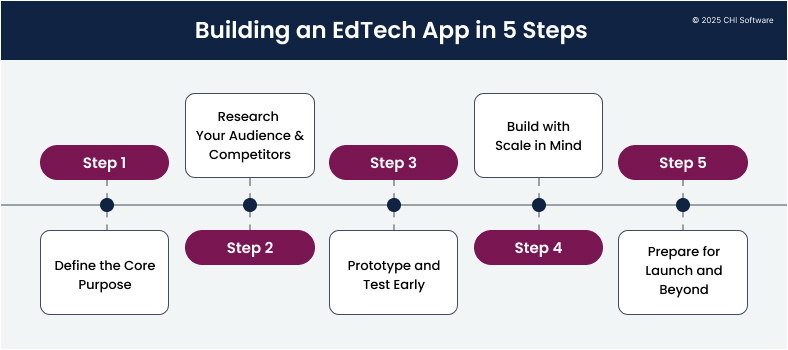
How to Create an Educational App in 5 Steps?
Before writing a single line of code, it’s wisest to take time to shape a product that solves a real need for real users. Here’s how we typically approach the process at CHI Software.
Here’s a simplified 5-step workflow of how to make a learning app, from idea to launch.
1. Define the Core Purpose
We start by identifying a specific educational gap your app will address. Is it exam prep for high schoolers? Language immersion for kids? Upskilling for professionals?
In our early-stage workshops, we often help clients reframe broad ideas into focused user goals, which is a critical first step in understanding how to develop an educational app that delivers real value. That clarity informs every design and tech decision that we will make ahead.
2. Research Your Audience & Competitors
We conduct user interviews, research the target market’s behavioral patterns, and audit similar platforms to uncover friction points and missed opportunities. For school-based apps, this process often extends into classroom settings, observing how teachers interact with students and how tools fit (or fail to fit) into real-life workflows.
For example, in a recent project, we discovered that 70% of the educator’s time went into grading and content duplication, an insight that directly shaped our automation roadmap.
Yana Ni
Chief Engineering Officer
3. Prototype and Test Early
We aim to test interactive prototypes not only with users, but also with stakeholders, including educators, admins, and parents. This approach helps to spot misalignment between intentions and expectations.
In one case, we prototyped three different flows for student onboarding, and the final version combined features from all three – a practical outcome for anyone looking to make an app for schools that actually fits with classroom realities.
Ivan Kuzlo
Engineering Director
4. Build with Scale in Mind
We always prioritize core functionality that drives adoption and engagement. Our teams use agile sprints to build modular architectures and align backend logic with future AI expansion from the start.
Also, we deliver most MVPs with a clear roadmap for adding advanced features such as adaptive feedback, dashboards, or multilingual support, without needing to rebuild the foundation.
5. Prepare for Launch and Beyond
Our delivery phase includes infrastructure setup, deployment strategy, QA automation, and observability. We also prepare fallback methods for content delivery such as offline sync and partial caching so that an app can still function even when internet connectivity is unreliable, which is a common issue in family-oriented or rural learning apps.
If you want to make an educational app that performs well in these conditions, such safeguards are essential. After go-live, we stay close to user data and refine features based on what learners, teachers, and admins actually do.
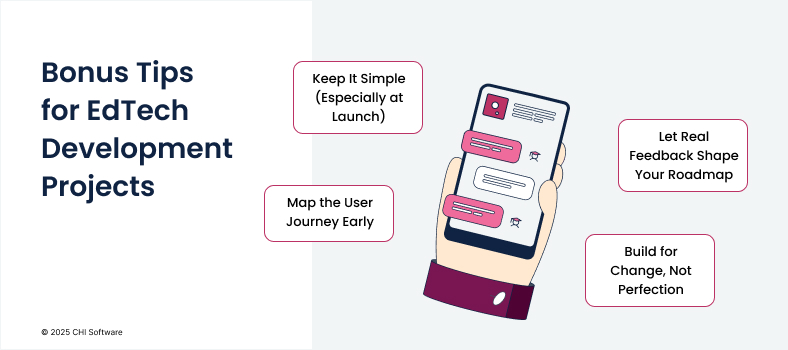
Bonus Tips Before Starting Educational App Development
Here are a few more insights we always share with our clients based on what’s helped our teams build stronger and leaner products:
These bonus tips for creating an educational app can help you engage users and adapt to their needs.
Keep It Simple (Especially at Launch)
Trendy features are tempting, but if you want to develop an educational app that truly resonates, your early users will really only care about one thing: does the app work for their goals? Clear flows, clean content, and minimal cognitive load will do more for retention than any superficial “AI-powered” label.
Map the User Journey Early
Before diving into design, it’s a good idea to map out how you expect that each user will navigate the app: where they start, what they aim to achieve, and where potential friction might arise. Whether you aim to create your own educational app or scale up an existing platform, a clear journey map helps reveal UI gaps before they become real usability and retention issues.
Let Real Feedback Shape Your Roadmap
Some of your favorite features may not land well with users, and that’s a good thing. Criticism is direction! Prioritize feedback from your most engaged users and let real behavior guide your iterations. Such adaptability is crucial in EdTech app development, where audience needs can vary widely across age groups and learning styles.
Build for Change, Not Perfection
Markets shift, expectations evolve, and so will your app. Architect your backend to be modular and versionable, especially if you plan to introduce AI later. A flexible foundation will save you time and budget down the road.
Cost Breakdown for Educational App Development
Because every person learns differently, every EdTech idea requires an individualized approach. We can help you do this from the very start by providing an initial consultation that reveals the cost of MVP development.
First, let’s have a look at the basic features and their development:
Feature
iOS development (hours)
Android development (hours)
Backend development (hours)
Sign-up
42
42
47
User profile (dashboard)
39
39
59
Search
21
21
22
Course (details and creation)
81
81
91
Payments
35
35
45
Course menu
95
95
88
Test creation
55
55
79
Push notifications
14
14
14
Total
382
382
445
Now, let’s look at the development process in full. In the next table, we list the hours required for all development stages and aspects.
Work to do
iOS development (hours)
Android development (hours)
Backend development (hours)
Project management/BA
190
190
162
UX/UI design
120
120
—
Features
382
382
445
Admin panel
—
—
100
Frameworks and libraries incorporation
20
20
35
QA and testing
450
450
400
DevOps
70
70
60
Total
1232
1232
1202
Here’s a comparison chart of the developer hourly rates depending on different territories, according to Clutch:
With an average hourly rate of 25-50 USD in Eastern European countries, the app’s cost lies within:
iOS development: USD30,800-USD 61,600
Android development: USD30,800-USD 61,600
iOS + Android: USD 61,600-USD 123,200
What We’ve Built in EdTech
CHI Software is experienced working with both startups and established education providers and helping them to launch, scale, and evolve their digital products in line with modern learning needs. Below are two examples of how our team turned concepts into real-world tools.
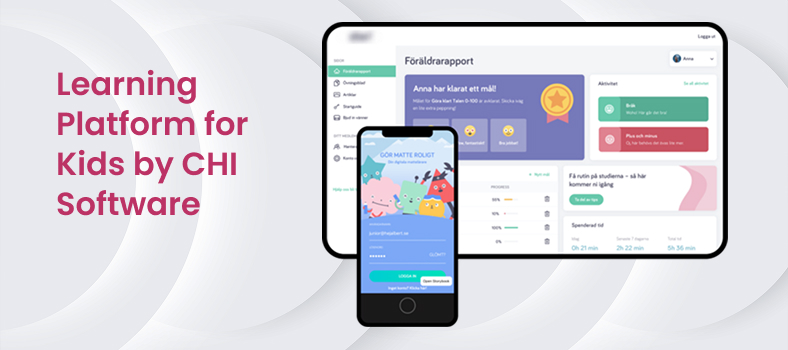
Online Learning Platform for Kids
A European education company approached us with a challenge: make an educational app that supports early learning for children aged 5-10, both at home and in the classroom.
We designed a web and mobile platform with customizable views for students, teachers, and parents. The product helped young learners develop consistent habits while giving adults the tools to guide their progress.
Screenshot of CHI Software’s online learning platform for kids, showcasing how to make a learning app engaging and age-appropriate.
Key features include:
Offline access for families with limited connectivity;
Gamified progress tracking with motivational rewards;
Role-based dashboards for content management and performance insights;
One of our clients, a public education authority, needed to create an app for teaching that could deliver large-scale student assessments across schools without overwhelming teachers or compromising reliability.
We developed a high-performance platform that can process complex assessments with minimal manual effort so that teachers could spend more time focusing on teaching instead of logistics.
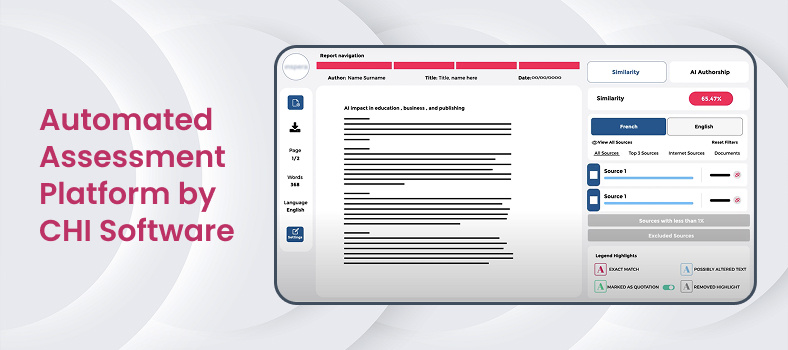
Screenshot of CHI Software’s automated assessment platform, illustrating custom EdTech app features for secure, large-scale student testing.
Delivered outcomes:
Scalable test engine with randomized content and timer logic;
AI-assisted scoring to reduce grading time;
Real-time educator dashboards with class-wide analytics;
Integration with external LMS and multilingual UI.
Thecase study shares more about how we developed this AI-powered solution for secure and large-scale student testing.
We will estimate the cost of your educational app based on the individual strategy
Contact our sales team
Conclusion
Educational apps shape how people learn, connect, and grow today – and often in moments that matter more than we realize. Behind every dashboard, notification, or lesson flow, a real person is trying to understand something new or teach their students with impact.
So, what is an educational app in today’s market? You’ll see that the best solutions are built with a deep understanding of both learning science and technology. CHI Software’s role is to help make that work more focused, thoughtful, and effective through design, technology, and the creation of every custom EdTech app we deliver.
When you’re ready for a second brain on your product, we’re here, ready to dive in. No templates, no hard pitch – just a real conversation. Reach out to us here, and let’s see where it takes us.
FAQs
What are the key differences between B2B and B2C educational apps?
The end users may appear similar, but the business goals, decision-makers, and product strategies differ significantly.
B2B educational apps (for schools, universities, training orgs):
- Require multi-role access (admin, teacher, student, etc.);
- Demand integration with existing LMS or HR systems;
- Focus on reporting, security, and scalability;
- Often involve formal procurement cycles.
B2C educational apps (direct-to-learner):
- Prioritize onboarding, habit loops, and retention;
- Must compete for attention in app stores;
- Rely on UX-driven monetization (freemium, subscription);
- Marketing and community often shape product direction.
What are the must-have integrations for educational apps?
Integrations help reduce manual work, improve engagement, and align your product with the user’s ecosystem:
- Payment systems: Stripe, PayPal, Apple/Google Pay;
- Video conferencing: Zoom, Jitsi, Daily.co;
- LMS platforms: Moodle, Canvas, Google Classroom;
- Push & email: Firebase Cloud Messaging, Mailchimp, Twilio;
- SSO & authentication: Google, Microsoft, OAuth 2.0;
- Analytics & monitoring: Mixpanel, Amplitude, Sentry.
Is it possible to build an educational app without a backend?
Technically, yes, for basic prototypes or static learning tools. However, most custom EdTech apps require a backend to support content management, user roles, data, and progress tracking. A backend doesn't need to be complex, but skipping it entirely will limit the product's potential for growth.
What analytics should I include in my EdTech application?
Good analytics help improve learning outcomes, user retention, and product decisions.
Analytics for learners:
- Lesson completion rate;
- Time spent per module;
- Repeated content or struggle points.
Analytics for teachers/admins:
- Class-wide performance trends;
- Engagement heatmaps;
- Learner activity vs. outcomes.
What accessibility features should we include in an educational app?
Key features to consider:
- Text-to-speech and voice control;
- Alt text for visuals;
- Keyboard-only navigation;
- High-contrast mode and font scaling;
- Subtitles for video/audio content;
- Screen reader compatibility (e.g., ARIA tags);
- Multilingual support.
Ivan keeps a close eye on all engineering projects at CHI Software, making sure everything runs smoothly. The team performs at their best and always meets their deadlines under his watchful leadership. He creates a workplace where excellence and innovation thrive.
Yana oversees relationships between departments and defines strategies to achieve company goals. She focuses on project planning, coordinating the IT project lifecycle, and leading the development process. In their role, she ensures accurate risk assessment and management, with business analysis playing a key part in proposals and contract negotiations.
Can you imagine the size of all the data on the internet? In 2024 it was calculated at 149 zettabytes – a trillion gigabytes – and by 2028, the volume of all the data in the world is likely to reach 394 zettabytes! This explosion of information continues to grow with every click, as countless data sources add to the...
Are you wondering how much it'll cost to add a chatbot solution to your business? You're not alone. As AI gets more competent, more companies are thinking about jumping on the chatbot bandwagon to boost their customer service and streamline operations. But let's face it – chatbot development costs can be as clear as mud. Whether you're a tech whiz...
As the global volume of data continues to grow, most of it no longer fits into structured formats. In fact, by 2025, unstructured data is expected to make up nearly 80% of the world’s digital information, according to Seagate and IDC’s joint study. The question is: how might it be possible to handle information you can’t structure and control and...
We use cookies to give you a more personalised and efficient online experience.
Read more. Cookies allow us to monitor site usage and performance, provide more relevant content, and develop new products. You can accept these cookies by clicking “Accept” or reject them by clicking “Reject”. For more information, please visit our Privacy Notice










For example, in a recent project, we discovered that 70% of the educator’s time went into grading and content duplication, an insight that directly shaped our automation roadmap.