Why Legacy Applications Are Becoming a Business Risk
Here’s an interesting fact: over 70% of applications used by Fortune 500 companies are still based on non-modernized systems built 10–30 years ago! Is that really a problem? Why change anything if everything works?
This is a common misconception — and as technology evolves, it can eventually lead to failure.
So why do legacy systems ultimately become a business risk?
Maintenance costs grow significantly — even today, some companies spend up to 60–80% of their IT budgets on supporting legacy systems.
Security risks increase, as outdated frameworks no longer meet modern application security standards.
Release cycles become longer — even minor backend changes can take weeks or months.
And of course, scalability becomes nearly impossible: system load grows, but scaling the application feels like “moving a mountain to Muhammad”.
Most importantly, legacy systems block innovation. If a company wants to integrate an advanced AI chatbot, implement machine learning, or enable real-time analytics, it will face serious limitations. Legacy systems are rarely designed to support such capabilities, making API integration extremely difficult. Outdated legacy software can also hinder business processes and reduce overall organizational efficiency.
This is where technical debt accumulates. Companies introduce tactical, temporary fixes, while strategically outdated architecture makes systems increasingly difficult to maintain and evolve.
The solution? Right legacy application migration to the cloud strategy. And it’s no longer just an IT upgrade — it’s a strategy for sustainable, limitation-free growth.
In this article, we’ll explore what qualifies as a legacy application, highlight key signs that indicate the need for cloud migration, and provide a step-by-step guide to preparing for and executing modernization.
Let’s get started.
What Counts as a Legacy Application?
A general definition of a legacy system can be formulated as follows:
A legacy application is a company system with outdated architecture that is difficult to maintain, hard to scale, expensive to update, and nearly impossible to integrate with modern tools. Legacy software often presents security risks, poor performance, and high maintenance costs, making migration to the cloud an effective solution to improve efficiency, scalability, and security.
Simply put, a system can be considered outdated if it has at least one of the following characteristics:
- Monolithic architecture — a tightly coupled system; legacy software often has monolithic structures that do not run efficiently on modern, distributed cloud servers.
- An outdated core programming language
- On-premises data centers that rely on physical servers
- Dependency on unsupported operating systems
Older legacy applications may also rely on obsolete frameworks or proprietary databases not supported in cloud environments.
Based on CHI Software’s experience, the largest number of legacy systems that remain tied to original technologies for years can be found in:
- ERP platforms
- Banking systems
- Insurance applications
- Internal business tools
EdTech applications are also frequently part of modernization projects at CHI Software.
Key Signs Your Legacy System Needs Cloud Migration Strategy
Making an immediate decision to migrate to the cloud is difficult — even when warning signs appear much earlier.
So what are those signals?
- Deployment cycles become slower, releases take weeks instead of hours
- System instability, frequent errors, and crashes
- Relatively high infrastructure maintenance costs
- Frequent breaches, viruses, and bot attacks that are difficult to prevent
- Poor performance during peak loads
- Integration issues with modern APIs
Many organizations face additional challenges when moving legacy apps, as these legacy applications are often deeply embedded in business workflows, making modernization and migration more complex.
A real “migration to cloud environments” example from CHI Software’s experience:
Our client, a fintech company developing investment solutions, reached a new stage of growth by targeting large enterprise clients. While their platform had previously performed reliably and efficiently, new enterprise-level requirements exposed the limitations of their on-premise system.
That’s when CHI Software stepped in and helped them complete a smooth cloud environments migration using AWS and Azure. Organizations often choose to migrate legacy applications to the cloud to enhance business agility and reduce operational costs.
One clear signal that a system is holding a business back is when business development grows faster than IT capabilities.
The Business Benefits of Migrating Legacy Systems to the Cloud
Cloud migration process is often perceived as purely an IT concern that doesn’t directly affect business operations. Maybe because of this, many large companies migrate only 15–20% of their applications to the cloud, even after years of using cloud solutions and SaaS products.
However, cloud computing enables organizations to move apps to the cloud, improving scalability, cost efficiency, and modernization. In reality, cloud migration delivers tangible business value.
Key benefits:
- Scalability: cloud systems automatically scale based on demand
- Improved reliability: modern cloud platforms offer 99.9%+ uptime
- Faster development cycles
- Enhanced security: cloud providers invest more in security than most companies can afford independently. Migrating to the cloud enhances security by providing access to modern security measures such as real-time threat monitoring and encryption.
- Seamless access to modern technologies: AI, machine learning, computer vision, and real-time analytics
Migrating legacy applications to the cloud can save money by offloading the management of physical infrastructure and reducing capital expenditures.
As a result:
- Faster time-to-market
- Reduced infrastructure costs
- Improved system performance
Cloud migration can improve customer experience by making applications more efficient and user-friendly, which is often hindered by legacy systems. Migrating legacy applications to the cloud can also lead to minimized operational costs by reducing hardware and IT support expenses.
- Global accessibility for distributed teams
- Ensuring business continuity
In other words, the cloud platforms transform IT from a cost center into a growth driver.
The 6 Most Common Legacy-to-Cloud Migration Strategies (The “6 Rs”)
Migration to cloud platforms is not a one-size-fits-all concept. Legacy migration requires selecting the right migration strategy based on application readiness and business value, often involving a phased migration approach to minimize risks. Not all migrations are the same. To choose a successful cloud migration strategy that aligns with business requirements, there is the “6 Rs” framework. This concept allows you to categorize the process of moving applications to the cloud. A SWOT analysis helps determine if legacy applications should be retired, rehosted, or refactored as part of the right migration strategy.
What does it consist of?
The following approaches: key migration strategies for legacy applications include Rehost, Replatform, Refactor, Retire, and Replace.
1. Rehosting (Lift and Shift)
Used when the budget is limited and deadlines are too tight. It allows you to move an application to the cloud without significant changes. The downside is limited use of cloud capabilities.
2. Replatforming
This involves minor optimizations (such as migrating to managed databases) without a complete redesign.
3. Refactoring
This is a deep restructuring of the application to a cloud-native architecture. It offers significant long-term business value but is typically complex to implement and requires a substantial budget and time investment.
4. Repurchasing
Analyzing the system and decommissioning its unnecessary parts—functionality that no longer adds value but only overloads the system.
5. Retiring
Analyzing and decommissioning unnecessary parts of the system — features that no longer deliver value.
6. Retaining
Essentially inaction following analysis and audit.
Temporary retention of the on-premise system due to technical or business constraints.
Step-by-Step Cloud Migration Process for Legacy Applications
Without a clear plan, app migration process won’t get you anywhere. You need a structure. Before starting migration, it is essential to thoroughly assess your existing IT environment and current environment to understand all infrastructure, applications, and dependencies. Organizations must also evaluate their current application architecture, tech stack, and data handling processes to ensure a smooth transition. Mapping dependencies is crucial for understanding how components interact within legacy applications and to ensure all parts function correctly after migration. Here’s a step-by-step guide to migrating legacy applications to the cloud providers.
Step 1 — Assess the Current System Landscape
Start with a full audit of applications, dependencies, and infrastructure—using tools like Azure Migrate for cloud readiness assessments and migration planning. A comprehensive inventory of the existing application landscape is necessary to prioritize high-value migration candidates.
Step 2 — Define Migration Goals and Business Priorities
It is essential that the goals and their implementation are aligned, whether the objective is to reduce costs, increase productivity, or implement AI/ML. It is important that the goals are clearly defined. For example, improving efficiency by n% compared to the system’s current state.
Step 3 — Choose the Right Cloud Architecture
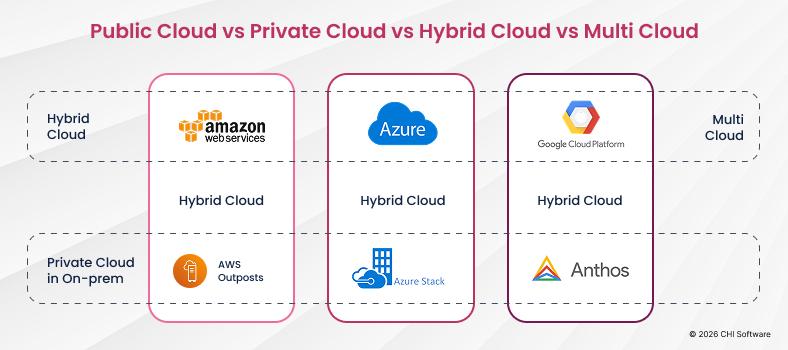
Common options for transitioning from an on-premises architecture to a cloud-based one include:
- Public cloud
- Hybrid cloud
- Multi-cloud
The choice depends on security requirements, scalability, and business objectives. Selecting the right cloud vendors is crucial, as choosing incompatible providers or platforms can increase management complexity and operational challenges. Additionally, choosing the wrong cloud platform can lead to overspending and further increase management complexity, impacting both efficiency and cost-effectiveness.
Step 4 — Build a Migration Plan and Timeline
Prioritize workloads and execute migration in cloud environment in phases – it’s essential.
Step 5 — Execute Migration and Test Systems
Don’t forget to perform:
- Performance testing
- Security checks
- Functional validation
Testing is critical for avoiding failures.
Step 6 — Optimize and Modernize After Migration
As funny as it may sound, migration isn’t just about migration. Continuous optimization is what lets you get the most out of the cloud.
Looking for a more detailed guide with in-depth and specific examples of cloud modernization? Click the link to read it. There, we provide a step-by-step guide to migrating to AWS services.
Cloud Service Provider Evaluation: How to Choose the Right Partner
Picking the right cloud service provider is basically the make-or-break moment for your legacy application migration project. The provider you choose will directly mess with your cost efficiency, security, and whether your migration actually succeeds in the long run. With major players like Microsoft Azure, Amazon Web Services (AWS), and Google Cloud throwing around all sorts of cloud native services and hybrid cloud solutions, you`ve got to do your homework based on what your business actually needs and the IT infrastructure you`re already stuck with.
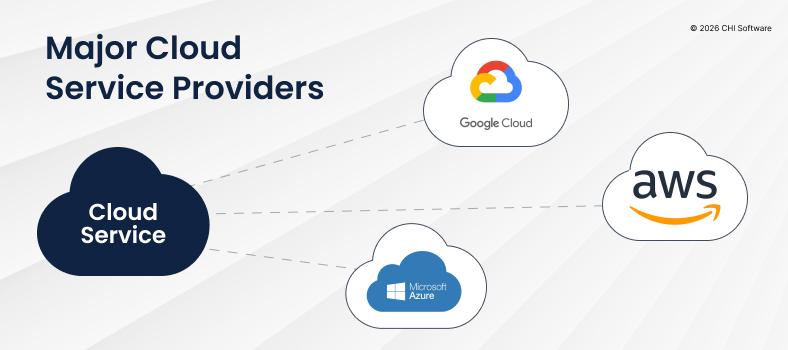
You`ve got to start by checking compatibility—does the provider`s cloud environment actually play nice with your current systems and applications? Next up, dig deep into their data security protocols and compliance certifications, especially if you`re operating in those heavily regulated industries like fintech, healthtech, or insurance. Take a hard look at the provider`s network architecture and how extensive their cloud native capabilities really are, including support for hybrid cloud deployments, which can be absolutely crucial when you`re transitioning away from on-premises infrastructure.
Another thing that`ll make or break your project is the level of cloud migration expertise and support they bring to the table. Look for a cloud service provider that`s got a proven track record in migrating legacy systems, solid documentation that actually makes sense, and technical support that won`t leave you hanging when you need business continuity throughout the migration process. Finally, you`ve got to consider their cost structure and what tools they offer for optimizing cloud resources, because these will directly impact whether you actually achieve those significant cost savings and operational efficiency you`re after.
By carefully weighing all these factors, you can select a cloud service partner that doesn`t just support a successful migration but also positions your organization for future growth and innovation. The sky`s the limit when you get the right partner who understands your business needs and can deliver the cloud solutions that`ll take your company to the next level.
Common Challenges in Legacy Cloud Migration (And How to Solve Them)
Challenges during migration to Hvar are a common occurrence for architects. The key is to identify them and have a clear solution. Here are some of those challenges:
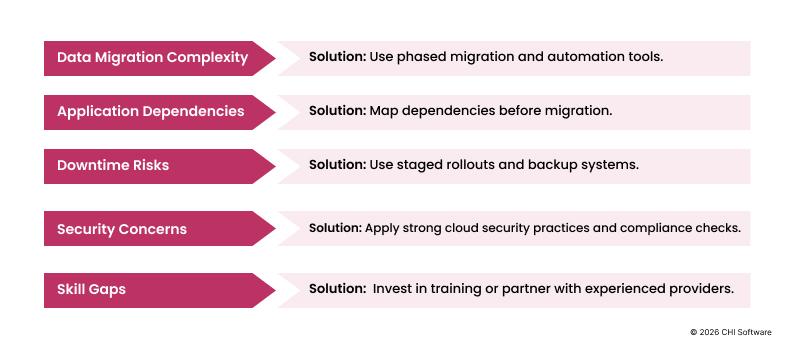
Challenge: The Complexity of Data Migration
Large volumes of data are difficult to migrate securely. They are vast and unwieldy. Some critical infrastructure detail may be lost, especially if the documentation hasn’t been updated in a long time. Ensuring compatibility between legacy applications and cloud infrastructure often requires the use of virtualization technologies such as virtual machines.
Solution: Phased migration and automation.
Challenge: Dependencies Between Applications
Legacy systems often have hidden connections that are not always described in the technical documentation. The importance of continuous integration and maintaining a continuous development environment cannot be overstated, as these practices enable smoother migration by allowing for frequent updates and ongoing risk assessment.
Solution: preliminary mapping of dependencies.
Challenge: Downtime Risks
Business disruptions are possible. This happens due to uncertainty or a lack of audit of the system landscape being modernized.
Solution: phased releases and backup systems.
Challenge: Security Concerns
Data protection remains critically important. There is also a risk of vendor lock-in when relying on proprietary technologies or legacy systems during cloud migration. Organizations should prioritize open-source or cloud-managed alternatives to reduce future migration hurdles and maintain flexibility.
Solution: implementation of modern security practices.
Challenge: Skill Gaps in Migration Team
Teams may lack sufficient experience. Skill gaps in cloud migration can slow down timelines and increase dependency on third-party vendors. Cloud migration requires a mix of skills, including infrastructure-as-code, DevOps, and cloud security. Qualified specialists need motivation.
Solution: training or collaboration with experts. Training teams on the cloud solution is essential to ensure a seamless transition.
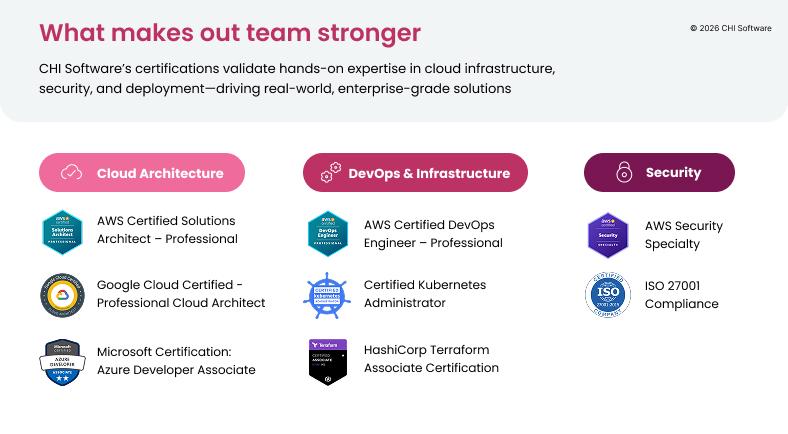
For example, at CHI Software, we have our own Education Office, which is responsible for developing comprehensive and ongoing training for technical specialists. We systematically organize internal courses, tech talks, and webinars. In addition, we support and assist employees in obtaining cloud certifications. Here are just a few of the certifications held by our key architects:
How to Prepare Your Organization for Cloud Migration
Technology is only part of the story. To obtain cloud-native environment, migration also requires organizational change.
Key factors:
- Cloud skills within teams
- Adoption of DevOps culture
- Increased automation
- Strong cross-team collaboration
Also important:
- Governance policies
- Security standards
- Change management processes
Successful migration happens when people, processes, and technology evolve together.
Conclusion: From Legacy Burden to Cloud Advantage
Legacy systems were once powerful assets that drove business value and competitive advantage. But times change — and technology evolves rapidly. Companies must learn to let go of outdated solutions to stay relevant.
Cloud migration changes the game: it strengthens systems while accelerating overall business growth.
It’s not just about infrastructure — it’s about:
- Scalability
- Innovation
- Rapid growth
- Business continuity
Companies that modernize their systems gain a real competitive edge.
The key question is no longer “Should we became cloud-native?”
It’s “How soon can we start?”
FAQs
-
What is a legacy application?

A legacy application is a system built on outdated technologies or architecture that is difficult to maintain, scale, and integrate with modern tools. Such systems often rely on old programming languages, monolithic structures, or unsupported operating systems.
-
Why are legacy systems considered a business risk?
Legacy systems increase operational costs, slow down development cycles, create security vulnerabilities, and limit innovation. Over time, they accumulate technical debt and prevent companies from adopting modern technologies like AI or real-time analytics.
-
When should a company consider migrating to the cloud?
You should consider cloud migration when:
- Release cycles become too slow
- System performance drops under load
- Maintenance costs are high
- Security risks increase
- Integration with modern APIs becomes difficult
-
What are the main benefits of migrating legacy applications to the cloud?
Key benefits include:
- Improved scalability and flexibility
- Reduced infrastructure and maintenance costs
- Faster time-to-market
- Enhanced security
- Access to advanced technologies (AI, ML, analytics)
-
What are the “6 Rs” of cloud migration?
The “6 Rs” framework includes:
Rehost (lift and shift)
Replatform (optimize without full redesign)
Refactor (rebuild for cloud-native)
Repurchase (replace with SaaS)
Retire (remove unused components)
Retain (keep as-is temporarily)
-
What is the first step in cloud migration?
The first step is a full audit of your current system landscape, including applications, infrastructure, and dependencies. This helps identify migration priorities and risks.
Rate this article
32 ratings, average: 4.7 out of 5