Businesses look to modernizing their existing systems to make them more scalable, faster, and easier to operate. Unfortunately, reality too often proves the opposite when instead of the growth you hoped for, you’re instead facing application modernization challenges. When performance regressions, increased latency, or scalability and integration issues start to creep up, the cause is not the modernization process itself, but rather the process having been done only partially, incorrectly, or poorly planned.
We at CHI Software have seen the aftermath of an inaccurate and incomplete modernization process, and have learned through experience how to avoid such a fate. In this article, we share our experience in hopes of helping you identify common modernization issues and understanding the most effective ways to address them.
Article Highlights:
- Application modernization typically leaves your app with degrading performance when it’s incomplete or performed without careful planning.
- The most common post-modernization issues arise when businesses modernize only certain components while leaving the rest of the system outdated. Other issues include weak testing, poor monitoring, and over-splitting services into components.
- At CHI Software, we always consider risks and try to prevent possible performance issues. In one of our cases, when an oncology platform modernization project posed the risk of creating a fractured architecture, we stepped in to avert disaster by redefining service boundaries to prevent future issues before they became critical.

Partial upgrades and hidden dependencies often cause performance issues after modernization before systems regain stability.
Challenge 1: Performance Regression After Partial Modernization
What Happens
Businesses usually decide to modernize one key feature that affects operations the most. After modernization, everything may look fine at first if the new feature works perfectly in isolation, and your developers don’t detect any flaws.
But picture this: some time after this new feature is released, the overall system begins to malfunction, and core workflow speeds degrade to legacy application performance levels. Meanwhile, users experience delays, and before long, analytics start to confirm an expansive impact to user satisfaction. What happened?
Why It Happens
Modernized services still rely on slower legacy components. For example, after a user submits a login form, an updated user profile service may confirm access instantly. But if the updated component still needs to wait for a response from an outdated security module, authentication will still feel slower to the user.
This bottleneck is called synchronous processing: the updated service cannot complete its work until all dependent components respond.
What is the Solution?
To resolve this challenge, CHI Software’s engineers typically take one of two paths: modernize the next critical dependency or remove unnecessary coupling between services. In practice, the processes include:
- Performance baselining: First, developers compare how the feature behaved before the update with how it performs on its own after modernization, and in the context of the full system. These comparisons quickly reveal which service dependencies are causing slowdowns.
- End-to-end-testing: Once these baselines are established, developers test the entire user journey from the moment a request enters the system to the final response. This approach highlights hidden delays that only appear when modern and legacy components interact. Together, these two steps reveal which components need to be modernized in line with the first feature updates.
- Working with synchronous and asynchronous boundaries: When possible, developers reconsider whether your updated service really needs to work in sync with other services, and when you may consider another approach. For instance, when a user places an order, your automatic notification service could instantly send an initial confirmation letter without syncing with the legacy inventory system.
Challenge 2: Increased Latency Due to Over-Distributed Architecture
What Happens
Another challenge in modernizing legacy systems comes from flawed development of microservices and modular architectures. This could be the case if you start noticing slower operations immediately after splitting you’ve split the application into modular components.
Simple user actions like opening a dashboard or submitting a form now take a few seconds longer than before. In extreme cases, page loads stretch into minutes, or critical flows shut down altogether.
Why It Happens
This slowdown happens when your internal operations are divided into too many components. One common example is businesses splitting billing into separate modules for pricing, discounts, tax, authorization, and refunds. When a user tries to process a checkout, all these services may try to respond simultaneously, resulting in a system overload. As a result, the checkout page lags, and the user abandons the cart at the last mile.

This illustration shows one common challenge in application modernization: excessive service splitting. When a single user action depends on too many backend calls, latency grows and responsiveness suffers.
Solution Direction
When clients come to us facing these issues, our engineers typically advise restructuring their services architecture to adopt APIs and event-driven patterns. In particular, addressing the core issue may include the following technical strategies:
- Service boundary design helps determine which functions need to be combined in a single feature and which should be separated. For instance, you can combine the price, authorization, and discounts modules, while the tax and refunds modules can sit separately for rare requests. This way, the system will require fewer calls on diverse modules to complete a user action.
- API integrations present another approach. Instead of forcing the entry service to call backend services one by one, an API steps in between them to manage the load: it decides where the request needs to go, bypassing the linear road through the whole backend system. These shortcuts help pages load faster.
- Event-driven patterns can speed up features that interact with other modules in your app. For instance, you can make your analytics and data synchronization services respond to each other’s updates in real time.
In our experience, the risks of over-distributed architecture often appear when a client needs to scale. For instance, one oncology platform modernization case we worked on required integrations with multiple laboratories and clinical workflows. Synchronizing data across them called for implementing microservices, but we also had to avoid architectural complexity. We balanced both priorities by carefully defining service boundaries.
Challenge 3: Scalability Issues That Appear Only Under Real Load
What Happens
Scalability issues in application modernization often surface at critical moments, once the platform is running and real users have already arrived. The problem may not have appeared in any preemptive experiments: all features are working as expected, and load tests pass. But then after business growth has taken off, or during a campaign launch or seasonal peak, the system unexpectedly becomes unstable and unresponsive.
Why It Happens
Scalability issues happen when developers don’t design test environments to fully mimic real conditions, instead only probing the system during smooth and predictable traffic.
In reality, scalability gaps only show up when the testing resembles real user behavior: many users may perform actions simultaneously, and some requests will be much heavier than others. Such testing scenarios reveal where your backend services use the same resources, which results in overloads.
Solution Direction
Improving tests for real-life traffic is a core strategy our engineers use to address or even prevent limitations in scaling. In particular, they:
- Develop production-like load testing. Engineers simulate user behavior as closely as possible. Improved testing scenarios often include traffic spikes and uneven user requests.
- Improve load observability. Developers track how your system behaves under load by identifying which modules slow software down and which requests consume more resources than others. Observing the whole system makes load issues diagnosable and predictable.
- Plan the system’s capacities based on your business scenarios. Engineers evaluate the load for the real events that happen most often in your app, like product launches or feature updates, and revise the platform’s capacity accordingly.
We have faced a scalability issue during financial management software modernization. The system seemed stable during our testing, but in the process, the client realized that their new enterprise clients will inevitably run heavier operations on their system. As a response, we redesigned our tests on the fly to check scenarios like multiple enterprise clients generating reports and syncing financial data simultaneously.
Challenge 4: Database Bottlenecks Surviving Modernization
What Happens
Imagine that you modernize several features at once — analytics, personalization, and content services. Updates work well and even stand up to real-life traffic testing — but only in isolation.
When you try to run all the modernized features at once, the app snaps back to slower performance or even shuts down. Simple operations that previously took milliseconds begin to queue behind heavier requests, causing cascading delays across the system.
Why It Happens
The problem arises if you haven’t modernized the data layer alongside other features. The thing is that all your core operations rely on the same backend databases.
Let’s say, a newly added AI analytics service queries the same “users” or “orders” tables as your user profile, billing, and order processing services. Over time, the database becomes a shared bottleneck for all services. As soon as traffic increases, the load on your database becomes overwhelming.
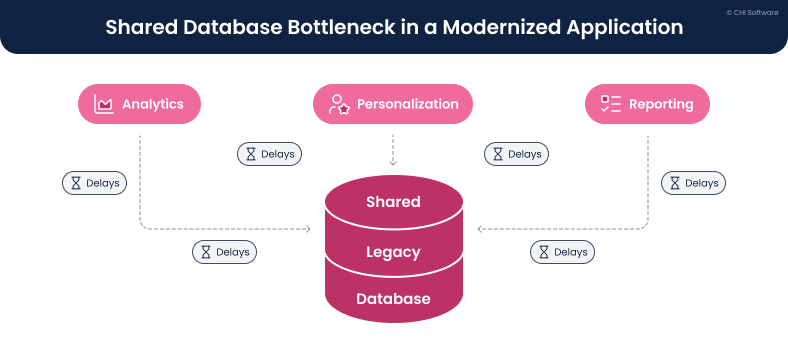
This illustration highlights one of the legacy modernization challenges: modern services competing for the same database.
Solution Direction
Our experts have faced this challenge in application modernization multiple times now. Their approach usually includes a few layers of work with databases:
- Database refactoring, which means rewriting wrong data paths that accumulate over time. Engineers organize critical data spread across different tables and fix queries that land in the wrong databases. This step helps clean the data first, so that modernized services can access it more easily.
- Optimizing queries from services to databases. Engineers look at the specific database requests that take the longest, like loading order history that scans the whole order table instead of only relevant records. Fixing such queries reduces critical load on databases.
- Separating operations that only read data from those that change (write) it. The operations that only read data are lightweight — opening a dashboard is one such action. Instead, placing an order or updating inventory adds new information, and needs another data path. Separating the two makes lightweight operations faster.
Challenge 5: Integration Performance Degradation
What Happens
Performance issues after modernization can also show up in features that depend on third parties — most often, businesses start noticing that integrations are behaving inconsistently.
Your payments can occasionally hang, or order confirmations are starting to arrive late. Such issues often happen specifically with newly modernized parts, but your developers are absolutely sure that there is nothing wrong with the service itself.
Why It Happens
Indeed, most often the problem in such cases is not in your updated services — it may lie in integrated legacy systems that haven’t caught up to your faster operations. For instance, your modern checkout service may instantly process user requests, but it still has to wait for a response from a bank gateway or shipping provider.
Solution Direction
Our team advises placing some sort of a buffer between the immediate user experience and the operational speed of your integration provider. Here are the main ways to do that:
- Decoupling user experience from integration speed. In simple words, it means that your platform doesn’t have to wait for the external system in critical moments. When a user places an order, your app can confirm a purchase and immediately send a notification about a successful operation — even if the external shipping service doesn’t respond.
- Asynchronous integration patterns. While the part of your system confirms the order, the other parts are trying to contact your integration partner, having more available waiting time.
- Isolation mechanisms. By applying an isolation mechanism, your app prevents repeated calls to a failing service. Instead, your platform stops trying to contact the provider for some time and lets the users know about the delay with messages like “Service is temporarily unavailable, try again.” Multiple queues between your service and the integrated platform can slow it down even further. In contrast, a little time out often restarts the operations.
Challenge 6: Monitoring and Observability Gaps
What Happens
Monitoring and observability obstacles in modernizing legacy systems often seem unclear and may appear in most random places in your app. For instance, you may notice that slower operations or shutdowns appear in reporting modules at times and in integrations or analytics at others. Then, out of the blue, the system starts to lag in analytics or content services, even after all your modernization efforts.
Why It Happens
The issue is not incidental: it lies in the over distributed system. When your operations are made of multiple independent services, user requests pass through some or all of them. Each such pass-point can cause minor performance issues — and without a clear monitoring service, it is hard to trace the full journey. In practice, small delays or resource bottlenecks can go unnoticed until they accumulate into one major performance problem.

This illustration explains how limited visibility becomes one of the obstacles in modernizing legacy systems.
Solution Direction
To overcome such issues, our engineers work on making the whole system observable and clear for businesses by:
- Installing a unified observability. Developers work on performance optimization by collecting metrics, logs, and events from all services in one place.
- Concentrating on distributed tracing. Engineers build technology that allows them to track the user’s or system’s workflow across all distributed services.
- Linking technical metrics to your business flow. Technical metrics like checkout completion often affect business metrics, such as revenue and user satisfaction. Having assessment tools that track both sides helps businesses see what happens in their software more clearly.
Challenge 7: Performance Impact of Security and Compliance Layers
What Happens
Performance issues caused by security and compliance can appear in the most affected services: authentication, data access control, or payments. While every other module, old or modernized, works well, these services start to take longer to respond. Moreover, you may start noticing growing overhead expenses coming from audits and maintaining security tools.
Why It Happens
Latency may happen because modern security checks usually involve multi-step processes that take longer to complete due to their inherent complexity. For instance, when a user logs in, a security system may need to verify their identity, secure the data, and then assign their access level according to the platform’s regulatory rules. While each individual step is small, together they can pile up, and the delay becomes especially amplified when traffic grows.
At the same time, if your developers are not working closely with regulations, they may play it safe by keeping extra checks, approvals, and controls everywhere. Alternatively, they may forget to turn off old security tools after modernized ones are introduced. Together, such small mistakes stretch your overhead budget.

Here you see how security and compliance requirements affect application modernization performance challenges.
Solution Direction
To balance security risks and performance, CHI Software’s experts apply these practical approaches:
- Security-performance tradeoff awareness: We warn our clients that some security measures are indeed just more voluminous — stronger authentication, deeper audit trails, encryption layers, and stricter access checks do take additional processing resources. You may need to prioritize either speed or more advanced security.
- Architectural separation of compliance logic: If both security and performance are critical, engineers can separate compliance-related processes into independent modules. This measure preserves the required security while allowing to manage the load separately, without affecting the core platform’s speed.
- Measuring security-related overloads: We encourage our clients to treat security controls as measurable components of their system. Authentication flows and compliance checks can sometimes add more latency and resources. Measuring these impacts explicitly allows you to compare the cost-effectiveness of different security measures and prioritize what your platform needs most.
Our engineers have worked with a similar issue during trading platform modernization. As data volumes grew, compliance with trading regulations turned into one of the main bottlenecks. Even small updates or routine trading operations took a long time. Since the system could not be shut down or rebuilt all at once, we separated critical trading operations from compliance-heavy processes.
Challenge 8: CI/CD and Deployment-Related Performance Risks
What Happens
Here’s the common situation you may fall into: after you modernize a CI/CD pipeline to release updates faster, the system may work properly only in the testing stage — until the new features go live. After release, your system starts behaving unevenly: all of a sudden, services may start using use more memory or change the order in which they call each other.
Why It Happens
In CI/CD pipelines, application modernization performance challenges tend to arise as a result of unclear system boundaries. When data and processes belong to different services at the same time, every new release slightly changes your system. Updated DevOps practices just reveal deeper architectural problems in your platform — something that your developers may have missed before the production stage began.
Solution Direction
When working with CI/CD pipelines, CHI Software’s engineers embed performance visibility into the deployment process at the early modernization stages. This approach allows us to identify hidden bottlenecks well before release time.
But even if your provider didn’t consider invisible architectural constraints before starting the modernization process, you can still address the problems afterward:
- Performance checks in CI/CD: Modern pipelines can include automated performance checks alongside functional tests. DevOps engineers validate critical user flows and system operations under expected load before changes reach production.
- Re-plan canary or phased releases: If you reveal that some updates are already harming user experience, it may help to roll the updates back and split them into smaller releases. For instance, you can test new features on a small group of users first.
- Establishing stricter release-level performance ownership: To avoid similar issues in the future, you can assign team members responsible for particular parts of releases. Clear ownership ensures that any slowdowns will be caught and can be corrected more quickly.
Conclusion
The challenges of application modernization can affect your app the most when your engineering project is poorly planned. If your tech partner doesn’t accurately predict the real load your app may experience or doesn’t place the right monitoring from the start, the performance will reveal these gaps later.
That’s why custom software modernization must be a careful process done by professionals. We have the expertise needed for both setting up the modernization process and addressing its complex aspects.
If you recognize your case among the challenges described in this article, there are technical approaches available that may help fix the issue. Contact us, and we will estimate the exact problem and outline possible solutions.
FAQs
-
When is it a sign that modernization performance issues require external expertise?

The most general sign that you need an external team is that you have already tried to fix the issue with internal efforts, but the problem returns or the operations break in a different place. The more particular cases when you should consider reaching out for help include:
- Performance that degrades across multiple areas at once. Slowdowns appear simultaneously in user flows, integrations, databases, and reporting, making root causes hard to isolate.
- Issues only surface under real business load. The system passes tests but fails during launches, peak usage, or enterprise onboarding. You have tried testing, hot fixes, and launching for a few times with no effect.
- Your internal teams lack cross-system visibility. Your engineers understand individual services but not how the entire platform behaves end-to-end.
-
How do performance issues affect the business beyond user experience?
On a large scale, businesses risk their reputational damage and financial losses if performance issues last. But before that happens, you may notice the first consequences within your system:
- Operational overload. Your engineers are spending more time monitoring and manually fixing issues than improving the product. As a result, operational effectiveness significantly drops.
- Higher support and maintenance costs. Growing volumes of support requests increase both customer-facing and system maintenance overhead.
- Delayed business decisions. Your reporting, analytics, and dashboards start lagging behind real activity. Consequently, your management has less ability to act quickly.
- Limited scalability. Even if demand exists, your system cannot reliably support new markets or enterprise clients.
- Compliance and risk exposure. As the system becomes slow or unstable, maintaining audits, controls, and data validation become harder.
-
At what stage of modernization should we evaluate performance risks?
We recommend evaluating such risks before modernization begins. By checking how the old system behaves, you can see what might already be slow or fragile. But if you are in the middle of modernization, you can calculate the risks at any point, the sooner the better.
-
How do we know if performance issues are caused by modernization or by existing system limitations?
The problems caused by system limitations look more predictable. If that’s the case, your platform may still work slowly — but you will find the reasons in outdated components or connections between them. Another sign is that new updates work fine on their own, but the whole system starts lagging once they interact with older components. Here’s one example: a new checkout service might process an order instantly, but if it waits for a legacy payment system, the process slows down.
In contrast, the issues that come from modernization show up as new or uneven behavior. A system may feel fast in some places but suddenly degrade when new features interact with legacy components, especially right after a release. Also, problems may appear only after deployments, during peak traffic, or when data moves across old and new boundaries.
-
How much performance testing is “enough” during modernization?
There is no perfect number of tests. However, in our experience, the most essential testing covers your critical user flow operations. For example, you surely need to test login, checkout, report generation, or data updates. That usually means running each flow several times (e.g., 5–10 repeats per scenario) to catch variability.
In this case it’s best to run several load tests to simulate realistic user volumes, spikes, and uneven requests. If your system can normally handle 1,000 users per hour, you should test it with 2–3 times that number to see how it can perform under stress.
About the author
Ivan keeps a close eye on all engineering projects at CHI Software, making sure everything runs smoothly. The team performs at their best and always meets their deadlines under his watchful leadership. He creates a workplace where excellence and innovation thrive.
Yana oversees relationships between departments and defines strategies to achieve company goals. She focuses on project planning, coordinating the IT project lifecycle, and leading the development process. In their role, she ensures accurate risk assessment and management, with business analysis playing a key part in proposals and contract negotiations.
Rate this article
168 ratings, average: 4.93 out of 5