Technologies like agentic AI and cloud computing stand out among the crowd for staying relevant in the business market, according to McKinsey’s Technology Trends Outlook. But is your app adaptable and modern enough to integrate these technologies in order to stay competitive?
That’s the question many business leaders start asking themselves. And unfortunately for many, the answer can be alarming: 75% of decision-makers expect to face technical debt on their platforms in 2026, rather than being able to expand the business. But this is precisely where an app modernization roadmap can step in to resolve the debt and improve your app performance.
In this article, we explore how your business can apply well-planned software modernization services to help you go from tackling legacy challenges to measurable business advantages.
Article Highlights:
- Market reports show some global critical infrastructure apps are still running on outdated Common Business-Oriented Language from the 1960s.
- For a mid-size enterprise, the average cost of legacy system maintenance may be around USD 10,000 annually. However, app modernization can help you reduce these costs.
- In our experience, app modernization helps to scale businesses and improve declining app performance. For a legacy oncology platform, modernization improved scalability by 25%. One legacy trading platform achieved 60% faster operations after modernizing.
5 Signs That You Need an App Modernization Roadmap Now
Implementing an application modernization strategy is a multi-step process. It may take up to a year, and when the process is overwith, your app will have significantly changed. That’s why businesses opt for clear roadmaps to guide them through the process, using measurable metrics and industry benchmarks. Below you will find a few fact-based indicators that your app may need a well-planned transformation workflow.

Not every company needs upgrades right away, but if you spot any of these signs, it’s time to build your app modernization strategy.
1. App Performance Issues
If you are starting to observe falling performance metrics on your app and have no clue where to start, this could be a sign that you’re in need of a legacy modernization roadmap. The industry benchmarks for app metrics are clear:
- According to Microsoft, apps should load in no more than five seconds.
- An acceptable mobile crash rate should be below 0.1% of user sessions, according to industry studies.
- An average refresh rate should target 90Hz, meaning the app should refresh the screen 90 times per second.
If your app starts falling short on any of these metrics, it’s a sign that you may want to start looking into modernization.
2. Technical Debt
After discovering poor app performance, businesses often hit the wall of technical debt – when developers have been using quick fixes for minor bugs for too long, so now they put more effort into re-patching the app than on actual development.
“Tech debt is a sinkhole, and we’re all trying to build the future on top of it,” — Greg Rivera, Head of Product at CAST.
Technical debt is virtually inevitable when building up any app: statistics show that 93% of engineers spend only 16% of their week building new features. Yet, when piled up for too long, technical debt can corrupt your app’s efficiency. It often takes a comprehensive, step-by-step modernization strategy to get out of this sinkhole.
3. High Operational, Maintenance, and Support Costs
You may even be noticing an even more alarming sign: companies pay an additional 10 to 20 percent on top of the costs of any project for tech debt expenses, according to McKinsey. These are the unnecessary costs you may be paying for code patches, specialized support for aging systems, and developers’ time.
For a mid-size business, the cost of maintaining an average legacy system can cost around USD 10,000 annually –
often driven by fragmented data ownership, manual document flows, and constant fixes in core HR and employee management systems. We see this pattern clearly in projects focused on employee data management system modernization, where outdated architectures quietly inflate support costs year after year.
A carefully calculated modernization roadmap helps eliminate these hidden expenses by stabilizing core data flows, reducing manual intervention, and making everyday operations predictable.
4. Old Programming Frameworks
Unfortunately, haphazardly patched bugs may not even be the worst of your worries, because there is an even greater danger that urgently calls for a modernization plan: an outdated programming framework. A few alarm signs may be showing that the situation is serious include:
- The official provider no longer supports updates.
- New APIs and cloud services no longer offer stable integration.
- Your tools, such as plugins and libraries, stop receiving upgrades.
These signs are rooted in a common business reality: some global organizations in the banking, insurance, governance, and logistics domains still run on Common Business-Oriented Language from the 1960s. Such outdated systems often struggle with integrations and security; and rebuilding them is a long-term investment that requires careful planning.
A good example is financial software modernization, where we gradually transformed architectures to restore security and long-term scalability without interrupting core business workflows.
5. Declining User Experience
The fifth clear sign for an IT modernization roadmap is one that typically snowballs from the first: if your app performs poorly, it will also result in a poor user experience. Here are some practical user experience metrics that may indicate that it’s time to modernize your app:
- Your customer support tickets are progressively increasing.
- User engagement rates are declining.
- Cart abandonment rates are growing.
- Your product starts falling behind on new features compared to your competitors.
- Your customer experience surveys capture user complaints about outdated interfaces.
Just one metric from this list could indicate a minor short-term issue. But if several of these metrics are trending in the wrong direction, you will likely need a comprehensive outlook on what is going wrong in the app’s features.
Benefits of a Well-Defined Modernization Plan
From the smallest startups to the largest enterprises, companies too often start addressing these types of problems too late, when the business is already struggling to stay afloat in the market. Having a well-planned app modernization process in place from the outset could easily prevent them from ending up in a reactive and risky position. Let’s take a look at how much safer it can be to instead carefully plan out your legacy app modernization.

Look before you leap — a solid legacy modernization roadmap shows exactly where the benefits await.
Measurable Impact and Accountable Change Management
A modernization roadmap forges clear cause-and-effect links between an application modernization process and business outcomes before any changes begin. Instead of vaguely planning to “improve app performance,” teams define concrete targets — for example, reducing checkout load time from five seconds to two.
This approach also makes accountability tangible. In our vehicle leasing software development project, a clearly structured modernization plan (among other measures) helped increase lease conversion by 30%, reduced manual operations, and ensured the platform could cope with traffic spikes without downtime. When metrics are defined upfront, both business stakeholders and engineers can align on priorities and ownership at every stage of modernization.
Reduced Risks
Suppose you dive head-on into the modernization process – in that scenario, you are likely to encounter unexpected risks and have to deal with them on the fly, for instance compliance requirements and customer support gaps that may arise if legacy modules are replaced hastily. Here, having a roadmap serves to help surface and address invisible risks early, before they cause outages or budget overruns.
Future-Proof Architecture
Strategic planning prevents architectural dead ends, in which changes only serve to solve today’s problems, but keep on delaying new features until tomorrow. For instance, in many older systems, background processes like sending notifications to users or syncing data are part of the app’s core code. If you modernize the app’s UI for a better customer experience without separating it from business-value features, each subsequent app update could break the flow between the two systems. A roadmap approach would conserve resources by accounting for future architectural needs in advance.
How to Build an Effective Application Modernization Roadmap Step by Step
So how does one set about creating a modernization plan that will reap the most benefits while accounting for as many foreseeable risks as possible? Let’s walk through the process one step at a time.
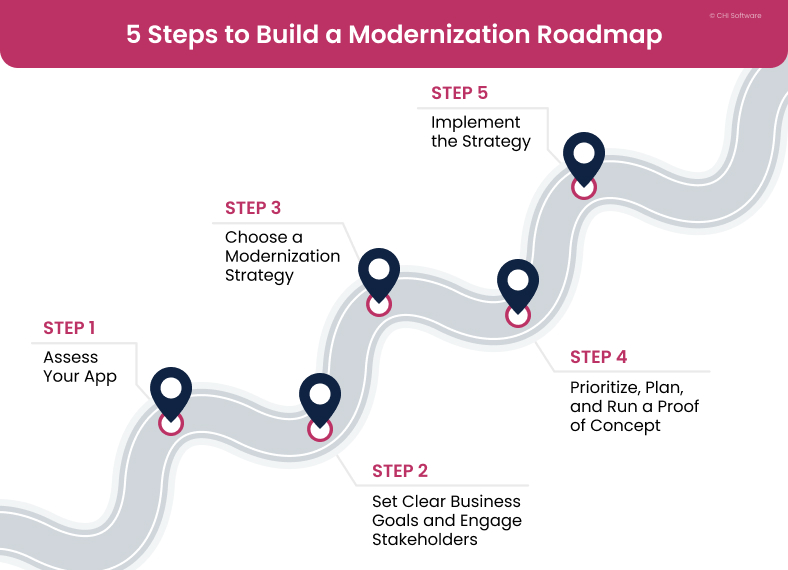
This preparation process includes every key step needed to build an application modernization strategy.
Step 1: Assess Your App
Assessing your app’s logs helps to discover hidden deteriorations in your operations, such as performance bottlenecks and outdated libraries. Your app may be struggling with any number of issues under the hood, and a quality assessment can reveal them all. That’s why at CHI Software, we usually run a few discovery steps, including:
- Running a complete codebase and feature relations dependency audit;
- Analyzing performance logs, slow queries, and overloaded endpoints;
- Evaluating your infrastructure and hosting setup to reveal scaling limits;
- Mapping all your integrations and data flows to identify points of fragility.
In practice, engineers try to run as many assessments as possible so they can understand your operations thoroughly. For instance, in the case of a legacy oncology platform CHI Software worked on, it was the final mapping step that helped to find the root issue:
Step 2: Set Clear Business Goals and Engage Stakeholders
The second step can happen before, after, or in time with the first. What matters most is that you and your stakeholders agree on why the legacy modernization process needs to happen now.
Step 3: Choose a Modernization Strategy
Once you are sure of the business goals for your modernization effort, you can choose the right path with confidence.
All application modernization strategies generally fall into the six-R framework:
- Rehost: Try this cost-effective strategy if you require app scaling, improved performance, and security compliance with minimal disruption to the app.
- Replatform: Replatform your app to get infrastructure updates without a full code rewrite.
- Refactor: Use refactoring when your codebase works, but you notice that it’s becoming harder to maintain and optimize. This is an optimal strategy for fixing technical debt.
- Rebuild: Opt for a full rebuilding only if your existing systems cannot support features, loads, or integrations that you need.
- Retire: If your business hasn’t actively used an app for a long time or hasn’t gained any valuable outcomes from it for a while, it may be better to leave the dead weight behind.
- Retain: If certain parts of your app systems run well or if modernization risks outweigh potential benefits, you can keep some app aspects as they are.
In practice, choosing the right approach depends on your priorities. In CHI Software’s experience, a global recycling leader needed to better connect manufacturers and return point operators across their logistics chain. The priority for recycling software modernization was to update the operations without a whole architecture overhaul, so the refactoring approach fitted best.
Every modernization journey is different. Let’s define the approach that works best for your systems and business goals.
Get a free consultation
Step 4: Prioritize, Plan, and Run a Proof of Concept
The next step in a roadmap for modernizing legacy applications is breaking your strategy into manageable pieces. By prioritizing which features or modules update first, your technical partner can reduce the risk of disrupting your operations.
A gradual and prioritized modernization works best in cases where you plan to transition your app from a monolithic structure to modular microservices. The legacy platform modernization is one of CHI Software’s prime cases — our team began by gradually rebuilding the platform’s architecture. As a result, each module in the platform now runs independently, giving the app the flexibility to scale.
Step 5: Implement the Strategy
If the whole process has been conducted correctly so far, modernization will not disrupt your operations significantly. At CHI Software, we have seen the proof in our work on a trading platform modernization — this solution could not afford any downtime, so we rolled out the refactored modules in stages. With that management approach, the platform achieved 60% faster operations without ever stopping the flow of business.
Conclusions
Finding the right app modernization strategy is indeed a complex, multi-step process. Thankfully, it’s not as challenging as business leaders sometimes imagine. With a clear roadmap, you can proactively respond at the first signs of problems in your app with safe and measurable change management.
At CHI Software, we have guided our clients through modernization and have seen them succeed. The businesses that reached out to us have seen a 25% boost in scalability, a 32% improvement in volume prediction, and 60% faster app operations. If you would like to see how to make a modernization process safe and predictable for your business with a well-planned roadmap, fill in the contact form and let’s start a conversation.
FAQs
-
How do I know which parts of my system need to be modernized first?

Deciding where to start can actually feel tricky, but it usually comes down to impact versus complexity. Here is what we’ve noticed helps our clients to make this decision:
1. Define and prioritize the modules that are critical to your daily operations.
2. Look for areas with high technical debt or fragile integrations.
3. Check whether updating specific features can unlock clear and immediate business benefits for you.
These three key decision-making criteria can help you in deciding on your first proofs of concept, as the testing process will reveal more data on whether or not you’re headed in the right direction.
-
How can we avoid creating new technical debt during modernization?
We asked Yana Ni, a chief engineering officer at CHI Software, to answer this question, and here is what she said:
“Technical debt can pile up so fast in your modernization process only if the team working on the project does not follow coding standards accurately.”
Here are the important points Yana highlighted to ensure good development standards:
- Ensure that the engineering team documents every change to your project.
- Use automated tests and continuous integration — they usually catch code issues early.
- Train your team to avoid quick patches and encourage developers to orient their work toward structural improvements instead.
- Make it a habit to frequently review designs and frameworks with engineers, project managers, and business stakeholders.
-
What modernization steps can be automated with AI today?
AI tools perform best in process automation and error analytics — that’s where it can be most beneficial to the modernization process:
- Discovering subtle performance bottlenecks;
- Analyzing code and suggesting refactoring steps;
- Detecting anomalies during migration;
- Predicting maintenance to track systems’ performance.
-
Can we modernize gradually without stopping ongoing releases?
Our team can typically conduct an entire modernization process without shutting down service and with minimal hiccups. Our engineers implement new features and modules in stages and keep legacy systems running in parallel until the new system becomes stable. With this approach, you can count on updating your app without impacting your ongoing projects.
-
What KPIs should I track to understand that modernization has really been effective?
KPIs for a successful modernization process span two general domains: technical and business. For the technical KPIs, you should track:
- System performance: Page load times, response times, error frequency, and crash-free sessions.
- Operational efficiency: Time needed to resolve bugs, frequency of hotfixes, and maintenance hours per release cycle.
- System stability and scalability: Concurrent users during periods of high transaction volumes.
Although tracking a clean correlation between business metrics and modernization is more complicated, you will likely notice improvements in user satisfaction trends, retention, engagement rates, and shorter release times.
About the author
Ivan keeps a close eye on all engineering projects at CHI Software, making sure everything runs smoothly. The team performs at their best and always meets their deadlines under his watchful leadership. He creates a workplace where excellence and innovation thrive.
Yana oversees relationships between departments and defines strategies to achieve company goals. She focuses on project planning, coordinating the IT project lifecycle, and leading the development process. In their role, she ensures accurate risk assessment and management, with business analysis playing a key part in proposals and contract negotiations.
Rate this article
117 ratings, average: 4.93 out of 5









When we worked on oncology platform modernization, our customer needed to connect with more labs and hospitals, quickly. The bottleneck was in data pipelines — and we discovered the issue while mapping the system at the first step.