Here is a number that should give any technology leader pause: roughly 70% of the software running Fortune 500 companies was written more than twenty years ago, according to McKinsey. Not refactored. Written, then left mostly alone while the business around it changed completely.
The systems still run, which is the trap. A legacy application works right up until its cost, security gaps, or inability to scale becomes a board-level problem, and by then the fix costs far more than it would have three years earlier.
This guide covers what legacy application migration to cloud really involves: how to tell a genuinely outdated system from one that is simply old, the risks that push companies to act, the six strategies and when each fits, a step-by-step process, the common pitfalls that derail a legacy to cloud migration, and a real story from CHI Software’s legacy software modernization services. The aim is a decision you can defend with numbers.
What Is Legacy Application Migration?
Legacy application migration to cloud means moving an aging on-premise system, with its data and integrations, into the cloud and reshaping it enough that the move pays off. Copying an old system into someone else’s data center changes the address, not the problems. Real migration decides, workload by workload, what to move as-is, rebuild, or switch off.
You will see the work called by other names too: moving legacy applications to cloud, migrating legacy systems to cloud, legacy app migration to cloud, or legacy application cloud migration. They all describe the same thing.
What Makes an Application “Legacy”?
A legacy application is a business system with outdated architecture that is hard to maintain, scale, change, and connect to modern tools. Age alone does not make something legacy; a twelve-year-old service that ships weekly is fine. The problem is age plus friction, which shows up as one or more of these traits:
- Monolithic architecture, tightly coupled, so a small change forces a full redeploy and the design does not run efficiently on distributed cloud servers.
- An outdated core programming language that few engineers on the market still know.
- On-prem data centers built on physical servers the company owns and patches by hand.
- Dependence on unsupported operating systems, obsolete frameworks, or proprietary databases with no cloud equivalent.
In CHI Software’s project history, the systems that stay locked to their original technology longest cluster in a few industries: ERP platforms, banking cores, insurance applications, and internal tools never revisited. EdTech platforms show up too, usually when a product outgrows the architecture it launched on.
When Cloud Migration May Not Be the Right Decision
Not every legacy system should move, and a firm that tells you otherwise is selling, not advising. Delay the move when a system is stable, cheap to run, rarely changed, and headed for retirement within a year or two: migrating it burns budget on something you are about to switch off. The same caution applies to workloads bound by data-residency rules the target region cannot satisfy, or a small application whose three-year on-prem cost is lower than the cloud bill plus the migration effort.
Readiness matters too. With no cloud skills, no automated tests, and no appetite to change, a rushed lift-and-shift just produces a more expensive version of the same mess; the honest first step is preparation, not migration. Deciding not to move a workload is a legitimate result of a good assessment.
DORA research across 5,000 practitioners is direct: AI amplifies whatever delivery system it lands in, so the cloud migration strategy you choose now determines whether AI tooling accelerates or destabilizes the platform beneath it.
Get a Free Cloud Migration Readiness Assessment
Why Legacy Applications Are Becoming a Business Risk
For years, “it still works” was good enough. It no longer is. The cost of standing still has climbed on five fronts, each landing on a different executive’s dashboard. Organizations where AI adoption is a priority face an additional constraint: tightly coupled legacy architectures see negative returns from AI-assisted development, according to a recent DORA report. Cloud-native migration is the prerequisite, not a parallel track.
Rising Maintenance and Infrastructure Costs
Old systems get more expensive every year, quietly. Gartner and Deloitte estimates put enterprise spending on legacy maintenance at 60% to 80% of the IT budget: money keeping the lights on rather than building. SnapLogic’s 2024 survey put the average at around $2.9 million a year, roughly double the figure five years earlier.
Security, Compliance, and End-of-Support Exposure
When a vendor ends support for an operating system or a framework, security patches stop, and every vulnerability found after that date stays open. For a bank, a healthcare provider, or anyone holding sensitive data, an unpatched core is a breach waiting for a date. Regulations such as GDPR, DORA, and HIPAA increasingly assume modern controls that legacy systems cannot provide, which turns “we’ll upgrade later” into direct regulatory risk.
Slow Releases and High Change Failure Risk
On a healthy platform a small change ships in hours. On a brittle monolith it takes weeks, because every edit risks breaking something no one fully understands anymore. Google’s DORA research is blunt: teams without a solid delivery foundation see change failure rates climb, and adding AI tooling on top only magnifies the instability.
Scalability and Reliability Constraints
Legacy systems were sized for launch-day load, not the load they carry now. When traffic spikes, during a sale, an enrollment window, or a market event, a system that cannot scale horizontally fails when it matters most. Cloud platforms scale on demand and commonly back critical services with 99.9%+ uptime; a fixed on-prem cluster cannot, and downtime at peak costs revenue and reputation at once.
Integration, Data, and AI Readiness Limitations
This is the constraint that stings most in 2026. Want to add an AI assistant, run real-time analytics, or plug into a modern partner API? A legacy core often refuses. SnapLogic reports that roughly a third of legacy systems cannot connect to AI tooling without prior modernization, their data trapped in proprietary formats far from any data warehouse a model could use. The AI initiative stalls at proof-of-concept, because the plumbing was built for a different era. CHI Software’s application modernization services exist largely to remove this blocker. SnapLogic research: legacy maintenance now costs organizations an average of $3 million annually, double the figure from five years ago. Cloud migration converts that fixed burden into elastic, usage-based spend.
Key Signs It’s Time to Migrate Legacy Applications to the Cloud
The decision rarely arrives as a single failure. It builds from signals that appear months ahead: deployment cycles slowing from hours to weeks, repeated instability, climbing infrastructure bills, breaches the old stack cannot fend off, poor performance under peak load, and integrations that need a custom workaround every time.
One signal outranks the rest: when the business grows faster than IT can keep up, the system has become the ceiling. That was the case for a fintech client of ours building investment solutions. Their platform had run reliably for years, but as they moved upmarket, the on-premise setup could not meet enterprise-grade requirements. CHI Software helped them across AWS and Azure, and the ceiling lifted.
These signals are easy to rationalize one at a time. The table below pairs each with the evidence to collect and the step it should trigger, a first-pass screen before committing to a full legacy cloud migration.
| Signal |
Evidence to collect |
Recommended assessment action |
| Releases take weeks |
Lead time and release history |
Assess CI/CD and architecture |
| Infrastructure costs are growing |
Three-year TCO |
Compare retain, rehost, and replatform |
| Peak loads cause failures |
Capacity and incident data |
Review scalability architecture |
| Integrations require custom workarounds |
Dependency and API map |
Consider replatforming or refactoring |
| Key technologies are unsupported |
Vendor lifecycle data |
Prioritize by security exposure |
A pilot migration on a low-risk, stateless service proves the approach on real production code before anything critical moves, with rollback criteria agreed before the first workload changes environment.
Start With a Controlled Migration Pilot
Benefits of Migrating Legacy Systems to the Cloud
Cloud migration still gets filed under “IT project,” which may explain why large enterprises, even years in, still run only 15% to 20% of their applications in the cloud. The value of migrating legacy applications to cloud lands on the business, not just the server room.
Faster and Safer Software Delivery
A cloud platform with proper CI/CD and automated testing changes the economics of shipping. Deployments that took weeks take hours, and because each release is smaller and tested automatically, they get safer too. On legacy systems those two trade off; in the cloud, with the right devops transformation services behind the pipeline, you get both.
Elastic Scalability and Improved Resilience
Capacity stops being a year-ahead purchase and becomes a setting: resources scale up when load rises and release when it falls, so you pay for the peak only while it happens. Redundancy across availability zones means a single hardware failure no longer takes the product down, and disaster recovery becomes tested, automated behavior.
Lower Infrastructure and Licensing Overhead
Moving off owned hardware removes a whole category of cost: servers, data-center space, over-provisioning bought “just in case.” Capital expense becomes operating expense, and managed services cut the licensing and patching bill for databases and middleware. McKinsey’s research: actively reducing technical debt frees up to half of the engineering time that was going to maintenance.
Better Security Visibility and Governance
Cloud does not make security automatic, but it makes it visible and enforceable. Major providers invest more in platform security than almost any single company could match, and surface controls as standard features: real-time threat monitoring, encryption at rest and in transit, centralized access logging. For teams handling sensitive data, that shift from hope to evidence is often the strongest single argument for the move.
Easier Access to Data, Analytics, and AI Services
Once workloads and data sit in the cloud, the analytics and AI services next door become reachable: a modern data warehouse, managed machine-learning tooling, and real-time analytics are an integration away, not a rebuild away. This is where a stalled AI roadmap starts moving, a natural point to pair the migration with bi modernization so reporting keeps up. CHI Software’s cloud modernization services treat this as the default endpoint, not an afterthought.
When Cloud Migration May Increase Costs
Honesty check: the cloud is not automatically cheaper. Moving legacy apps to the cloud unchanged often costs more than on-prem, because you pay rented rates for the same waste. Chatty applications rack up egress charges; idle resources bleed money quietly. The cloud rewards systems designed for it and punishes ones merely relocated, which is why strategy selection matters.
The 6 Most Common Legacy-to-Cloud Migration Strategies
Migrating legacy applications to the cloud is one decision per workload, and the “6 Rs” model gives you a shared vocabulary for each call. A quick portfolio analysis, weighing business value against technical readiness, tells you which path fits each application. Rarely does a whole estate take a single route.
1. Rehosting (Lift and Shift)
Move the application with minimal changes. It is the fastest, cheapest path up front, which tempts teams when budget and deadlines are tight. The catch: you inherit the old design and most of its limits, so the cloud’s real advantages stay locked. Rehosting buys time; it does not fix architecture.
2. Replatforming
Keep the core mostly intact, but swap a few components for managed cloud equivalents, a self-managed database for a managed one, say. Moderate effort, moderate reward: operational relief without a full rewrite, a sensible middle path for many workloads.
3. Refactoring
Restructure the application into a cloud-native design: microservices, managed data stores, the works. This is the expensive, slow, high-skill option, and the one that delivers the full payoff in scalability, resilience, and delivery speed. Reserve it for applications that carry real business value.
4. Repurchasing
Retire the custom application and move to a commercial SaaS product that does the same job. The trade is configuration and integration work in exchange for shedding maintenance entirely. It fits commodity functions like CRM or payroll, where a packaged product already does the job.
5. Retiring
Audit the estate and switch off what no longer earns its place. A surprising share of any legacy portfolio is dead weight, features nobody uses. Turning them off costs almost nothing and removes both spend and attack surface. The only risk is discovering, too late, that something depended on it, so verify before you pull the plug.
6. Retaining
Sometimes the right move is no move, for now. A workload with hard constraints, regulatory, technical, or financial, stays on-prem deliberately while the rest proceeds. Retaining is valid as long as it is a decision rather than a default, and the deferred risk stays on the roadmap.
The table below lines up the six side by side, so the trade-offs are visible at a glance.
| Strategy |
Code changes |
Migration speed |
Initial cost |
Cloud benefits |
Main risk |
| Rehost |
Minimal |
High |
Low |
Limited |
Moving technical debt unchanged |
| Replatform |
Moderate |
Medium-high |
Medium |
Moderate |
Platform-specific dependencies |
| Refactor |
Extensive |
Low |
High |
High |
Scope and delivery risk |
| Repurchase |
Configuration and integration |
Medium |
Variable |
High |
Functional gaps and vendor lock-in |
| Retire |
None |
High |
Low |
Cost removal |
Undiscovered business dependency |
| Retain |
None |
Not applicable |
Low initially |
None |
Deferred risk and cost |
A phased cloud migration roadmap keeps live operations stable while each milestone moves a defined workload, giving the board visibility into cost, timeline, and risk without requiring a single cutover window that stops the business.
Request a Board-Ready Cloud Migration Roadmap
How to Migrate Legacy Applications to the Cloud: Step-by-Step Process
Teams asking how to migrate legacy applications to the cloud want a repeatable sequence, not improvisation. Here is the one CHI Software follows, with the reasoning behind each step.
Step 1: Assess the Current System Landscape
Start with a full audit: every application, dependency, and piece of infrastructure. Cloud-readiness tooling such as Azure Migrate helps inventory workloads and surface hidden connections before they surprise you. CHI Software’s Azure application modernization services turn that assessment into a ranked roadmap, high-value and low-risk workloads first. Skip this step and every later one inherits the gaps.
Step 2: Define Migration Goals and Business Priorities
Decide what “success” means in numbers before you move a single workload. Cutting infrastructure cost, shortening release cycles, and unblocking an AI roadmap lead to different architectures. Write the target down concretely, “cut provisioning time from days to minutes,” not “improve efficiency,” so you can tell afterward whether the migration delivered.
Step 3: Choose the Right Cloud Architecture
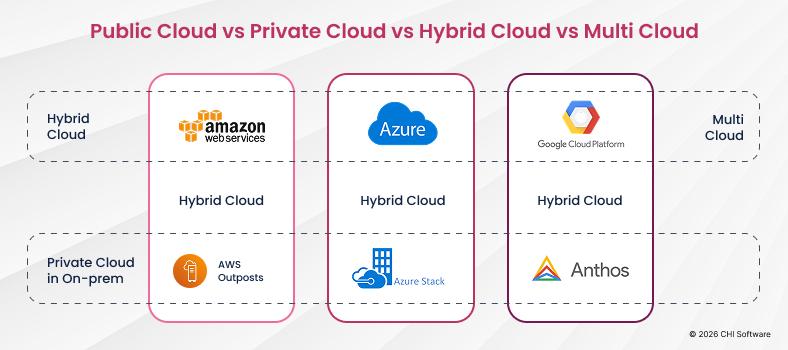
The main options for moving off an on-prem setup are public cloud, hybrid cloud, and multi-cloud, and the choice follows from your security, scalability, and cost requirements. Regulated data may argue for hybrid; avoiding vendor lock-in may argue for multi-cloud, at the price of added complexity. Getting this wrong is expensive both ways, so it is a natural point to bring in software architecture consulting before decisions harden into infrastructure.
Step 4: Build a Migration Plan and Timeline
Sequence the work into phases, low-risk workloads first, each with its own success criteria and rollback plan. Define go/no-go criteria, rollback trigger, and RTO before any code moves. Run under load in parallel before cutover. Document what passed, what failed, and why. Document what passed, what failed, and why. A phased approach keeps the business running, so a problem in one wave never threatens the whole program. This is where CHI Software’s legacy system migration services map dependencies into a delivery order that avoids surprises mid-project.
Step 5: Run a Pilot Migration
Before anything critical moves, migrate one small, stateless, low-risk service end to end. A service like that can be easily migrated to the cloud, which makes it the ideal pilot: it proves the approach on real production code and exposes gaps in tooling and process while the stakes are low. Agree the rollback criteria before the pilot starts, not after something goes sideways.
Step 6: Execute Migration and Test Systems
Now the main waves move, one phase at a time. Testing is not a final gate; it runs continuously: performance testing under realistic load, security checks, and functional validation against the old system’s behavior. Blue-green deployment runs the new environment in parallel until fully validated under real load. Rollback criteria are agreed before cutover, not invented when something breaks. Skipping validation to hit a date is the most reliable way to turn a migration into an incident.
Step 7: Optimize and Modernize After Migration
Reaching the cloud is the start of the payoff, not the finish line. Right-sizing resources, tuning autoscaling, and refactoring the workloads rehosted under time pressure convert a completed migration into real savings and speed. For a deeper walkthrough, our step-by-step AWS modernization guide goes further.
Cloud Service Provider Evaluation: How to Choose the Right Partner
Choosing a cloud provider is one of the few migration decisions genuinely hard to reverse. The three major platforms, Microsoft Azure, Amazon Web Services, and Google Cloud, all offer deep cloud-native and hybrid options, and the right pick depends on your existing stack more than any single feature comparison.
Start with compatibility: does the provider’s environment work cleanly with the systems and languages you already run? A Microsoft-stack shop often finds Azure easiest; a data-heavy workload may lean toward Google Cloud; broad service depth points many teams to AWS. Then examine security and compliance, especially in regulated sectors like fintech, healthtech, and insurance, because the certifications a provider holds shape how hard your own audits will be.
Finally, weigh what only matters when something goes wrong: support, partners’ track record with migrations like yours, and tooling for controlling cost once you are running, since an unmanaged infrastructure-as-a-service cloud bill climbs fast. Proven migration experience and support that answers when production breaks beat a marginally cheaper rate card.
Common Challenges in Legacy Cloud Migration and How to Solve Them
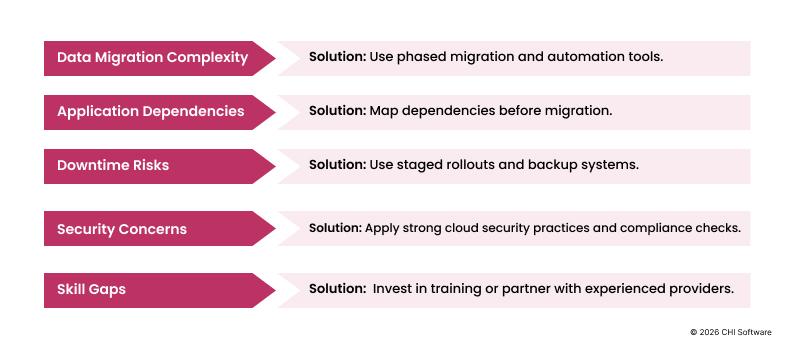
Every legacy cloud migration hits friction. The teams that succeed name each of the common pitfalls early and bring an actionable solution to it. Here are the five that show up most, and how CHI Software handles each.
Data Migration Complexity
Large data volumes are hard to move safely, and the risk is not just downtime. Undocumented schema quirks and years of edge cases can corrupt a transfer, especially when the documentation is years out of date. The fix: phased migration with automated validation, moving data in controlled batches and reconciling record counts and checksums at every step. When the data model itself is the bottleneck, CHI Software’s data modernization services restructure it as part of the move rather than carrying the mess forward.
Hidden Dependencies Between Applications
Legacy systems are full of connections nobody documented: an overnight job that quietly feeds another system, a table two applications both write to. Miss one and something breaks after cutover.
The fix: Map dependencies before touching anything, using automated discovery and interviews with the people who have run the system for years. Where those links run through brittle point-to-point integrations, api modernization services replace them with clean, documented interfaces.
Downtime and Business Continuity Risks
For a system that runs the business, an unplanned outage during migration is the nightmare scenario.
The fix: Techniques that let old and new run in parallel, Blue/Green deployment, canary releases, and feature toggles, so traffic shifts gradually and can shift back instantly. On CHI Software migrations, a rollback playbook with a recovery time objective under fifteen minutes is agreed before deployment, not improvised during one, and uptime held at 99.9% to 99.95% while workloads moved.
Security and Compliance Concerns
Data protection cannot lapse for a second, and a new environment adds fresh exposure if handled carelessly. There is also a lock-in trap: leaning on one provider’s proprietary services can make the next move painful.
The fix: Build security in from the first sprint, encryption, least-privilege access, audit logging, and favor open standards and infrastructure-as-code so the architecture stays portable. CHI Software’s ISO 27001 certification means these controls are audited practice, not promises.
Cloud Skills Gaps in the Migration Team
Migration needs a specific mix, infrastructure-as-code, DevOps, and cloud security, that many internal teams have not built yet. A skills gap stretches timelines and deepens reliance on outside help at the wrong moment.
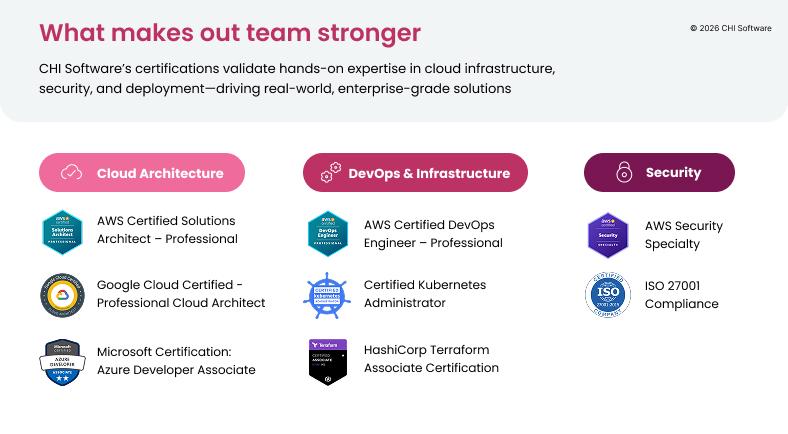
The fix: Train the existing team, bring in experienced people, or both. CHI Software runs an internal Education Office with ongoing training, courses, tech talks, and webinars, and backs engineers through cloud certification. A few of the credentials our architects hold:
How to Prepare Your Organization for Cloud Migration
Technology is the easier half. Moving legacy systems to the cloud also asks the organization to work differently, and the programs that stall usually stall on the human side, not the technical one.
Four shifts matter most. Teams need real cloud skills, not a weekend course; a DevOps culture where delivery and operations share ownership rather than throwing work over a wall; more automation, so repeatable tasks stop consuming senior engineers; and genuine cross-team collaboration, because a migration touches every part of the business at once.
Underneath those, the guardrails have to exist: clear governance policies, agreed security standards, and a real change-management process. Knowing how to move a legacy system safely is as much about people and process as technology. When only the technology moves, old habits reassert themselves within a quarter, and the cloud bill arrives without the benefits.
Legacy Application Cloud Migration Case Study
Let us walk you through a modernization that ran on a live trading floor. We modernized an internal trading and portfolio platform for a global investment firm. The engagement is about a year in and ongoing.
Starting Architecture and Business Constraints
Our client ran trading and portfolio management on one monolithic internal platform. It worked for years, and it sat at the center of daily operations, so nothing could just be switched off.
Why the Existing Environment Could Not Support Growth
As trading and data volumes climbed, processing dragged and reports loaded slowly. Small updates took too long in one tangled codebase. Worst of all, compliance checks became slow, manual work, and management could not pull insights fast enough to act.
Migration and Modernization Strategy
Taking trading offline was not an option, so the rebuild was incremental. A team of 20 worked module by module, moving functions out of the monolith into independent microservices on AWS. The core shifted to .NET 8 and EF Core, with releases on automated CI/CD. Sequence was deliberate: architecture, technology, automation, security, infrastructure.
Architecture, Security, and Integration Decisions
Every technical decision came back to one rule: change any part without putting the rest at risk. That shaped the architecture, the security model, and how the pieces talked to each other.
- Service Іsolation: Each service ran on its own container on AWS EKS, so a change in one no longer risked the rest.
- Release Automation: Terraform defined infrastructure as code and Jenkins ran the pipelines, making releases reproducible and traceable.
- Data Retrieval: A Python ETL layer and a reworked warehouse sped up retrieval across PostgreSQL, MySQL, and SQL Server.
- Live Synchronization: SignalR and IBM Queue kept every view current as trades moved.
- Access Control: Group roles plus SSO replaced the old access model, cutting audit effort and meeting compliance standards.
- Interface: The frontend was rebuilt in Angular.
How Business Continuity Was Protected
The legacy platform stayed live throughout. Modules were replaced one at a time while the rest kept running, so traders never lost service, and traceable CI/CD releases removed the manual coordination that made deployments risky.
Measurable Outcomes
The rebuild paid off where it mattered most, on speed, scale, and cost. Here is what changed after the migration:
- +60% faster performance: steady through market peaks.
- ×5 scalability: five times the concurrent operations, no added downtime.
- +30% stronger security and compliance: auditable access, shorter reviews.
- ×2 faster delivery: twice the release cadence.
- −20% infrastructure cost on AWS.
- +40% higher user satisfaction from real-time analytics.
Lessons Applicable to Similar Migrations
Continuity had to be a design constraint: with no room for downtime, the phased path was the only workable route. Splitting services on AWS enabled phasing, and early CI/CD kept the team shipping while the architecture evolved. None of this is specific to trading. Any business-critical monolith hits the same questions.
Conclusion: From Legacy Burden to Cloud Advantage
Legacy systems earned their place once. They ran the business for decades, and that history is why they are so hard to let go. But the ground has shifted: what was a stable foundation is now, for many companies, the main thing holding growth back, and the cost of waiting compounds every year.
Moving legacy applications to the cloud is not really an infrastructure project. It is a decision about scalability, resilience, and whether the business can adopt the next wave of technology, AI included, or watch competitors do it first. Done with a clear strategy, workload-by-workload judgment, and continuity engineered in, it turns the oldest part of the estate into the part that finally moves fast.
Cloud migration allows organizations to modernize incrementally while live operations continue, addressing the Run vs. Change tension that every CIO faces.
The question worth asking is no longer whether to become cloud-native. It is how soon you can start, and which workload goes first.
Cloud migrations that reach production on time share one structural advantage: architecture decisions, DevOps setup, security controls, and post-launch support sit under a single accountable delivery model rather than across four separate vendors with no shared responsibility.
See How One Partner Covers the Full Migration Scope
FAQs
-
What is a legacy application?

A legacy application is a business system whose outdated architecture makes it hard to maintain, scale, and connect to modern tools. Age is a factor, but the real markers are technical: monolithic design, an outdated core language, unsupported dependencies, and expensive on-prem hardware.
-
When should a company consider migrating to the cloud?
When the warning signs stack up: releases that take weeks, rising costs, failures under peak load, integration workarounds everywhere, and unsupported core technology. The strongest single trigger is when growth outpaces what IT can deliver and the system becomes the ceiling.
-
What are the main benefits of migrating legacy applications to the cloud?
Faster and safer software delivery, elastic scalability, lower infrastructure and licensing cost, stronger security visibility, and direct access to modern data, analytics, and AI services. The cloud turns capacity and capability into settings rather than year-ahead purchases.
-
What are the "6 Rs" of cloud migration?
Six strategies for handling each workload: Rehost (lift and shift), Replatform (minor cloud adjustments), Refactor (rebuild cloud-native), Repurchase (switch to SaaS), Retire (switch off what is unused), and Retain (deliberately keep on-prem for now). Most migrations mix several across the estate.
-
What is the first step in cloud migration?
A full assessment of the current environment: every application, dependency, and piece of infrastructure. This inventory drives every later decision, from strategy to sequencing, and skipping it is the most common reason migrations run over budget.
-
What is the difference between cloud migration and application modernization?
Migration moves an application into the cloud; modernization reshapes it to run well there. A pure lift-and-shift is migration without modernization, and it disappoints because it relocates the old problems. Most successful programs combine the two, moving and improving workload by workload.
-
Can a legacy application be migrated without downtime?
In most cases, yes. You can migrate a legacy application to the cloud without downtime using Blue/Green deployment, canary releases, and running old and new systems in parallel, so traffic shifts gradually and rolls back instantly if needed. On recent CHI Software migrations, uptime held between 99.9% and 99.95% while workloads moved
-
How do you measure whether cloud migration was successful?
Against the goals you set before starting: release frequency and lead time, infrastructure cost against revenue, uptime and recovery time, and whether previously blocked capabilities, AI features, real-time analytics, enterprise deals, are now unblocked. If you did not define success up front, you cannot answer this afterward, which is why Step 2 matters.
About the author
Ivan keeps a close eye on all engineering projects at CHI Software, making sure everything runs smoothly. The team performs at their best and always meets their deadlines under his watchful leadership. He creates a workplace where excellence and innovation thrive.
Rate this article
32 ratings, average: 4.7 out of 5