Ten years ago, EdTech platforms could get by and perhaps even thrive on a centralized, monolithic learning management system and entertain learners without personalized UX. Back then, basic analytics and limited mobile support were enough to grow a customer base and stabilize the platform.
But in 2026, the modern EdTech platform stack needs to be able to support personalization in order to attract users and automate the necessary business operations to reduce costs. Digital transformation in the educational sector is pushing the modern tech stack toward a combo of data management, wise content generation, AI, UX optimization, and cloud computing.
For product owners and other decision-makers, this shift raises a practical question: which architectural and technology choices will support the next stage of business growth? In this article, we will help you review essential technologies for educational apps before committing to long-term platform development or modernization.
Article Highlights:
- Choosing the right architecture for your platform determines how easily data flows through your operations and how quickly you can add new features.
- Architectural choices shape your cloud strategy, security, and integrations.
- Cloud-native frameworks are the top choice for businesses looking to scale. Google Classroom is a prime example of designing a platform as cloud-native from the start, targeting a large audience base.
- In CHI Software’s experience, UX improvements to the online learning platform contributed to as much as a 50% increase in user engagement.
Architecture: The Foundation of Any Modern Learning Platform
Whether you are starting to develop an app from scratch or modernizing, an e-learning platform architecture lays the ground for all your features. The most successful EdTech platforms strategically align their architecture with the online learning experiences they aim to provide.
The range of digital architecture tools that may support your business goals is wide, so let’s look at some specific examples.

This overview of e-learning platform architecture shows how technical choices shape learning flows through modular design, event-driven communication, and API-first integrations.
Monolith vs. Modular vs. Microservices
Choosing between monolith, modular, and microservice architectures determines how quickly the platform’s features can be updated and how personalized they can become for students. The choice usually evolves with a digital learning platform:
- Startups typically begin with monoliths to launch and validate a product faster and cheaper, with all its features unified in a single codebase. However, such a structure cannot support quick updates because changing a simple content delivery flow can require overhauling the entire system.
- Businesses switch to modular when they need expansion: every feature can run and be changed independently. App releases can then happen faster, with higher deployment success rates. Over time, feature development and maintenance also cost less.
- Large businesses expand further to microservices when their platform’s features need to scale unevenly. For instance, when Coursera’s video streaming service deals with thousands of logs for hundreds of courses during peak seasons, it makes sense to divide the streaming component into transcoding, storage, and access-control services.
Small and medium-sized EdTech companies often stick to a modular approach, as it leaves room for their features to grow at a moderate cost.
Event-Driven Architecture
After the business reaches the modular stage, the next strategic step is to adapt an event-driven architecture. The companies typically start with a request-based architecture, where a user or process must request something from the system. Once a teacher grades an assignment, a grading module sends queries to the student progress, notification, and analytics modules one by one.
But such linear operations are not effective enough when you need your platform to respond to user actions automatically, in real time. That’s why businesses move to an event-driven architecture, so that each module reacts to events immediately. As soon as a teacher grades an assignment, the system automatically sends a notification to students and readjusts recommendations for the next module based on the student’s mistakes.
API-First Architecture & Integrations
Schools and EdTech businesses do not usually cope with internal operations on their own — they often rely on external systems for enrollment, authentication, billing, AI assistance, or data warehousing.
That’s why the architectural tech stack for EdTech platforms should be crafted with APIs in mind from the start: it makes your platform inherently connectable, without the need for custom workarounds for each external vendor. An API can pass student assignments from your platform to multiple AI agents, and return the AI’s feedback. As a result, you can integrate and test as many AI agents as you wish, all with minimal management and maintenance from your side.
API-first architecture also reduces the routine maintenance burden within your platform. When the user sends a request, an API can immediately route it to a specific module — lesson, user progress, or recommendations. You don’t have to involve and maintain the whole backend while doing so.
Babbel is one standout example: the platform used API gateways as a single entry point for clients. When Babbel updates its lesson logic, engineers only adjust routes, without having to rearrange the backend code.
Frontend Layer: Where Learning Happens
The frontend tech stack impacts user experience — it helps students learn and focus without interrupting the studying flow. A good UX is interactive, engaging, and consistent across devices: it guides students through material and a learning platform natively, without students ever noticing they are being guided.
But that level of natural seamlessness requires advanced frontend technologies. Let’s walk through the most important ones.
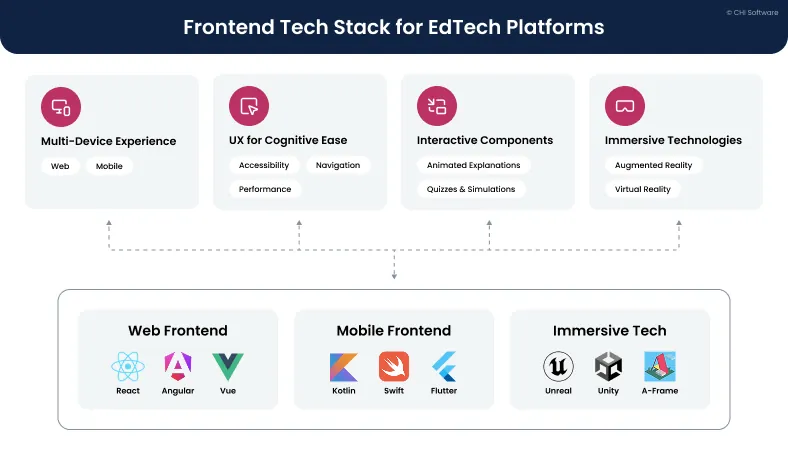
The frontend overview highlights key EdTech platform technologies used to build interactive, multi-device learning experiences.
Multi-Device Experience (Web + Mobile)
Modern education can provide consistent user experiences across devices. On the technical side, consistency relies on different tech stacks for desktop and mobile:
- Frameworks like React, Angular, or Vue provide fast-loading and reliable interfaces for desktops.
- Native and cross-platform technologies work for mobile. Native stacks such as Kotlin for Android and Swift for iOS deliver the highest performance and device-level control, while cross-platform frameworks like Flutter or React Native help reuse interfaces across devices.
In practice, when a teacher opens your platform on a digital whiteboard in class, the React framework can show an assignment review feature in full-screen mode. When learners log in from their mobile devices — whether iOS or Android — they can see the same feature in a smaller interface, thanks to native or cross-platform frameworks like Kotlin or Swift.
In other cases, it is students that are switching between desktops and mobile devices. We have seen such a case when working with an online learning platform stack: many students loved studying languages on desktops, but a growing part of the audience also began to prefer using their smartphones. Kotlin and Swift frameworks were employed to build iOS and Android versions of the platform and strengthen it with new interactive subtitles, personal vocabulary banks, and smooth video playback.
UX for Cognitive Ease
The frontend architecture has a direct impact on how smoothly users can navigate your platform or application without breaking their learning focus – otherwise known as cognitive ease. That ease of use is crucial: students may already feel overwhelmed by new material. Your UX design needs to be intuitive and clean so as not burden them with unnecessary mental effort. To achieve that, businesses should focus on making the UX predictable and with minimal complexity so that students can interact with the platform’s features and move through learning stages without distractions.
Developing an intuitive user experience can actually be narrowed down to measurable factors. In our project for a Swedish EdTech startup, targeted UX improvements led to a 50% increase in student engagement. That number didn’t come from nowhere — it was a result of comprehensive search and filter features, interactive components, and dashboards.
Interactive Components
Interactive components in your app make learning more active for students, helping them to understand and practice what they’ve learned through direct engagement with the content. That’s why animated explanations, exercises, simulations, and quizzes belong at the core of EdTech platform features. These components turn abstract ideas into clear visions — learners can manipulate abstract technical concepts and see their mistakes or achievements visualized.
In practice, however, interactive components can only support learning when they stand on a strong backend architecture and serve particular goals for your content. For instance, a higher EdTech stack can support an interactive lesson recommendation feature: once a student completes a lesson, backend analytics can then recommend the next best content pieces.
Then, the interactive component lets the user choose between options. In such cases, interactive features do not distract students with flashy visuals – but instead try to actually help them learn proactively.
Backend Layer: Data, Logic, and Learning Flows
While the frontend defines how learning feels for students, the backend connects content, users, data storage, and workflows — basically defining how your platform functions. Let’s look at how backend technologies support your platform’s core capabilities.

The backend of the EdTech technology stack shows how business logic, data storage, and performance tools support learning flows and platform scalability.
Business Logic Layer
A business logic level supports your product decisions: it defines how users can interact with your content and features. For instance, this layer includes:
- User roles and permissions: You assign what students, teachers, and admins can and cannot do, as well as their responsibilities. For instance, it establishes who can create courses, grade assignments, view analytics, or manage users.
- Content rules: You can program a module to only open after the previous module is completed, or assign the progress bar to move after each user action, like watching a video within a module, or after the module is completed.
- Assessment workflows: This defines how assignments are submitted, graded (manually or automatically), reviewed, and retried. This layer can define the logic behind the deadlines, grading criteria, and feedback loops.
- Progress tracking: This layer records learning progress in real time: it can track completion status or progress bars to advise students on better learning paths based on their actions, such as finishing lessons.
Such rules and logic flows typically run on Java, Node.js, Python, Go, or .NET programming languages — they have mature ecosystems and testing frameworks that ensure consistent performance for any type of backend logic.
Consistency in performance and clear service structuring help EdTech platforms scale and evolve more easily. We have seen such a case while working with an e-learning platform.
The company wanted to be able to scale abroad, but its outdated tech stack lacked interactive features and did not run across different devices.
Node.js helped to develop multimedia learning tools, interactive reward systems, and unlockable achievements. The platform became more coherent and structured, which allowed the business to scale into nine countries.
Databases & Storage
EdTech databases and storage power the functionality of other components, from figuring out users’ UX preferences to feeding machine learning algorithms. Their power comes from different technology for managing structured and unstructured data:
- A structured query language (SQL) stores user records, grades, and course progress metrics — information that is uniform and easier to track.
- Not only SQL (NoSQL) databases take in unstructured and fast-changing data, like user clicks, behavioral patterns, student social media feedback from students, and real-time analytics.
- Large amounts of unstructured data, like videos and interactive lessons, reside in self-contained units within the object storage. The units are easier to archive; they are more durable and flexible than both structured and unstructured databases.
The database and storage layers become essential in cases such as EdTech data migration, where the platform’s data needs to move easily from web to mobile. We used ExoPlayer and AVFoundation frameworks to store media content in object storage. The tools helped us to make information about user progress, content state, and media assets instantly available across devices.
Performance & Scalability
EdTech platforms rarely operate under steady load. Exams, enrollment periods, and assignment deadlines stretch through studying semesters, so educational platforms have to maintain performance almost year-round.
To ensure a stable performance and the system’s responsiveness, businesses use particular technologies:
- Redis (REmote DIctionary Server) can act as a short-term memory system within e-learning platform technology. With Redis in place, your platform doesn’t have to bother databases every time it needs to access minor information, such as user sessions.
- Kafka/RabbitMQ tools help your platform respond to user queries quickly by separating immediate-response components, like grading, from analytics and other heavy backend processes.
- Containerized services (like Kubernetes) support your cloud infrastructure layer. They move your platform’s services through cloud environments and make sure that each feature responds correctly to user or system requests.
Together, these tech components support platforms’ day-to-day performance. They enable fast responses and stable behavior even during periods of heavy server load, so your platform doesn’t freeze or crash mid-session.
Cloud Infrastructure: The Invisible Engine Behind Modern Learning
The cloud layer behind an EdTech platform can do more than just store information — it can route your traffic, balance loads, and actively update your systems in real time. Let’s review the technologies that can make that happen.

Cloud infrastructure within an EdTech platform stack, showing how deployment models, security, and scalability technologies support reliable and global online learning.
Cloud-Native vs. Cloud-Ready vs. Hybrid
These cloud modes can best fit different business needs and priorities:
- A cloud-native framework works best for scalability. Cloud-native frameworks are designed from the ground up to run in the cloud. Such platforms can scale easily, as they support frequent feature releases and efficiently manage data pipelines. Here’s an example: in 2014, Google intended for its Google Classroom platform to be widely adopted by schools from day one — that’s why the company chose a cloud-native approach.
- Hybrid clouds support safe growth. Hybrid clouds use both diverse public cloud services and on-premise data centers. Hybrids suit companies that deal with high-volume content management but want to protect student data with on-premises systems, like Canvas, Moodle, and Blackboard, used in universities.
- Cloud-ready systems work well for transitional periods. Cloud-ready systems use on-premise infrastructure, but their modular architecture allows them to be migrated to the cloud with minimal redesign. This approach works well for older educational platforms that are just beginning to move their operations to cloud environments.
Cloud Computing in Education: Benefits and Applications
Read more
Security & Compliance Basics
Security and compliance are particularly important in the cloud, where data can run on shared, internet-accessible infrastructure. That’s why EdTech businesses adopt strong data protection technologies, where:
- Everything starts with secure data storage. Cloud databases provide isolated environments so that no third parties can access data, and provide backups in case of a breakdown.
- As an additional layer, engineers apply encryption using custom cryptography so that data remains unreadable for unauthorized parties both at rest and in transit.
- Finally, access policies and audit logs protect data from internal threats, for example someone gaining unauthorized access to a teacher’s personal device. Such technologies ensure that only authorized people can access data, and record every log to notice any suspicious activity.
Regional regulations define how these principles are applied in practice. In Europe, GDPR focuses on personal data protection and transparency, while in the United States, FERPA sets strict rules around student education records.
The regulations may also vary by the industry. Higher education technology solutions often focus on keeping students’ identities anonymous, while other EdTech platforms may need to protect corporate user data. In one of our projects, meeting corporate requirements involved deploying Kubernetes – an orchestration system that manages the platform’s modules in the cloud – within Microsoft Azure to secure document storage, implement access controls, and reduce dependency on third-party services.
Performance & Global Reach
The platform’s tech stack determines whether you can provide stable performance on a global scale — for instance, to broadcast videos and live webinars without long load times. Achieving such real-time responsiveness requires the combination of a few cloud technologies that can provide both speed and resilience in use:
- Content delivery networks place videos, lessons, and assessments closer to users geographically – that way, content load times are shorter.
- Object storage steps in if the content is too large. It hosts video lectures or course libraries, making it easier for content delivery networks to manage.
- Load balancers then distribute the remaining traffic overloads across servers so that the platform remains stable even during peak usage times, like exams.
- Auto-scaling mechanisms help when the traffic comes in rapidly and unpredictably. For instance, if users worldwide were to react to a social media post and start downloading your app, auto-scaling ensures your platform stays up.
- Container orchestration tools (often Kubernetes) work behind the scenes: they move and manage your platform’s modules to make sure the lesson content gets delivered.
AI Automation Layer: The Brain of EdTech
AI has grown beyond simply an add-on role in education. When integrated correctly, intelligent tools can support teachers and students with content that meets their needs at any time of the day. Let’s take a look at how it works in practice.

This AI automation loop, as part of EdTech platform technologies, shows how intelligent tools support assessment automation, learning personalization, and early student risk detection across the learning cycle.
Content & Assessment Automation
AI technology is most commonly used for automating content generation and assessments — manual tasks that drain most of the prospective and creative energy from education:
- Creating quiz questions that are both unique and aligned with course learning objectives.
- Evaluating and grading even open-ended student responses objectively against criteria selected by the teacher.
- Giving feedback and adapting the tone of questions to each student in real time.
AI can perform these manual tasks with more consistency than educators do, freeing teachers’ time for more attentive communication with students. That’s why higher education technology becomes especially essential — the number of freed teachers’ hours quite soon converts into the quality of education they can provide.
The frontier EdTech businesses are already driving the quantity-to-quality transformation in education. When we helped a Norwegian EdTech platform to add new AI assessment features, the platform reduced teachers’ grading time by 70%. We also added an AI analytics layer so that the platform could analyze students’ patterns and misconceptions in assignments. Teachers can now spend more time learning deep-rooted students’ mistakes and adjusting lessons.
Personalization & Recommendations
Apart from helping teachers with automation, AI tools can improve student learning outcomes through the full learning cycle:
- First, AI-based adaptive learning can analyze students’ behavioral patterns to detect the most common mistakes.
- Then, AI personalization tools can recommend the right content to students based on the detected struggles.
- Right after, it may help with revisions and spaced-repetition schedules, covering the exact processes that affect the final grades.
When students come to their classes, they can be sure that the content, assessments, and topic relevance are all up to date and have been tailored to their interests. The latest point is actually a real case we have developed, using AI to make studying more personal and flexible for students. An AI chatbot creates assessment questions for diverse topics, including IT and business, while tailoring question formats. Students can now access study content that adapts to their interests and learning needs for all of their classes.
Predictive Analytics
Having a predictive analytics layer within your platform helps address issues that teachers and admins often fail to catch in time. By the time instructors notice low student performance on your platform, it may already be too late, and students have already gotten resentful and retention rates have started to churn.
But the first alarm bells emerge long before that, when students are just starting to show lower engagement. Integrating AI into your learning management system (LMS) technology stack can help detect early signs of dissatisfaction, like declining login frequency, shorter session durations, and unfinished lessons or assessments. With AI tools, EdTech teams can intervene in time and also reveal where courses may need improvement.
What to Bring to the First Call with a Vendor
EdTech technologies can support a diverse range of your operations. Which ones you need, however, will depend on your particular case. A vendor can help you to select the right tech stack that will fit your current business needs. To enter into vendor negotiations effectively, you should prepare a few things beforehand.

This visual shows what information to prepare for the first vendor call, helping experts define an EdTech tech stack faster.
Clear User Scenarios
Before the first vendor call, define concrete user roles and learning flows within your platform: students progress through enrollment and lessons, while teachers spend time grading and analyzing.
Vendors need to understand how users navigate through the platform to avoid breaking essential features while aiming to add something new. For instance, user scenarios impact continuous integration and continuous delivery (CI/CD) pipelines: the ways how you update your platform without ever shutting the platform down. In such cases, it’s crucial to know where your users will first notice a breakdown, and plan workarounds to update accordingly.
Content Structure
Before having the first call, it’s important to outline how your educational content is structured and what formats you work with today. At a high level, content is usually organized into lessons and course modules — this defines the core learning flow of the platform. You can typically find the ways these materials are stored in your content management systems (CRMs).
Within your lessons and course modules, you should distinguish particular content types you use — videos, audio materials, text-based lessons, quizzes, assessments, and user-generated interactions.
Also, outline the formats you want to add. It may include interactive simulations, AI-generated content, or richer analytics-driven experiences. Having that structure ready will help your vendor to plan storage and build better business-feature alignment from the start.
Data Requirements
In addition to content, your platform also relies on backend data — the one that runs behind the scenes to make your platform work. Such data can include student IDs, grades, progress trackers, logs, platform audits, and student behavioral data. This type of information often runs on specific rules, which govern:
- Where different types of data live. Prepare a simple data map that shows which systems store which data types. For example, student profiles and grades live in a primary database, while learning activity events are stored in analytic logs.
- Who owns and manages this data internally. Define data ownership roles within your organization. Specify who is responsible for student data accuracy, who approves data access, and who manages compliance and retention. The roles may vary between product owners, developers, or academic staff.
- What rules apply to data usage. List the policies governing your data usage — for instance, regulatory requirements (GDPR, FERPA, COPPA) or specific access levels that you already know of.
Documenting these data requirements upfront gives vendors the context they need to design secure data flows and compliance from day one.
Integration List
Before the first call with a vendor, it’s important to clearly outline which external systems your platform relies on. The first checkpoints to look for would be:
- Learning management systems. Businesses often use tools like Moodle, Canvas, or Blackboard to manage their courses, lessons, and assignments.
- Student information systems like Skyward and Ellucian often help businesses store students’ identity data and course registrations.
- Customer relationship management systems, such as HubSpot, Salesforce, or Zoho, support sales and learner lifecycle management.
- Payment and billing, media management platforms, and analytic systems. For instance, if you use PayPal, AWS Media Services, or Google Analytics, include them in the list.
Knowing your platform’s integrations will help vendors access potential technical constraints in your platform’s architecture.
Long-Term vision
The final step before contacting a vendor is defining what features are critical for you now and which can wait until later delivery phases. Defining clear development priorities enables vendors to estimate timelines and resources more accurately.
Essential features are those your platform cannot function without at launch — for example, core course delivery, user authentication, progress tracking, assessments, or basic reporting. These elements define the initial scope, technical complexity, and performance requirements for the vendor’s project planning.
In contrast, future-phase features may not be your first priority from day one. For instance, adaptive assessments or mobile expansions are often developed later in the project, after the essential features.
Conclusion
EdTech platform technologies evolve alongside businesses to make learning actually intuitive and effective. Teaching complicated concepts becomes possible with interactive components, and tracking student progress in real time becomes a new must-have with the emergence of AI.
In this business and technology collaboration, custom educational software development has become progressively more nuanced in recent years. It aligns best-fit data, cloud, AI, and UX technologies to deliver specific features for learners.
At CHI Software, we observe innovations with great enthusiasm. If you feel the same and are figuring out what exact technologies can support your business goals, your next step is a call with a vendor. Fill in the form, and we will contact you to help you estimate the roadmap and initial action items based on your goals, data requirements, and content structure.
FAQs
-
What level of frontend complexity do I need for an engaging learning experience?

Required frontend complexity depends on your goals and platform maturity:
- Basic UI is enough for content-driven platforms with videos, texts, and simple quizzes.
- Medium frontend complexity works best for most EdTech products. It enables interactive assessments, smooth feedback, mobile-friendly UX, and light personalization.
- High frontend complexity is justified when learning depends on real-time interaction. - That’s your best choice if you plan to use simulations, collaboration, or immersive experiences such as virtual labs or AR/VR.
As a rule of thumb, start simple and add complexity only when it directly improves learning outcomes or engagement. In our experience, an engaging learning experience comes from understanding where your students feel bored or lose focus.Often, improving a single element (such as a quiz, progress indicator, or feedback flow) has a bigger impact than redesigning the entire interface.
-
What signs indicate that my backend won’t scale during peak usage?
Generally, the backend layer doesn’t scale well when your services are tightly coupled. Monolithic systems have synchronous request chains and shared databases, and they do not scale nicely. But beyond that inherent complexity of monolithic systems, you can look up for particular signs from your daily operations:
- Slow response times or timeouts during exams, live sessions, or assignment deadlines;
- Manual server scaling or frequent emergency hotfixes;
- Limited observability (no clear logs, metrics, or tracing to diagnose issues);
- Frequently emerging database bottlenecks, such as long-running queries and slow report generation;
- Backend doesn’t support real-time features.
-
When does it make sense to invest in AI automation, and when should I wait?
On average, the best time to invest in AI for EdTech platforms is when you are noticing manual processes that consume your resources and can be automated. Grading, repetitive content tagging and moderation, customer support, reporting — these are common manual processes that move to automation the easiest.
However, keep in mind that AI automation is only possible when you have enough of the platform's historical data to train an AI model on.
On the contrary, the signs to wait would be:
- Core learning flows are still unstable or frequently changing;
- Data quality is inconsistent or poorly structured;
- AI would automate a process that isn’t yet well-defined;
- Compliance, privacy, or explainability requirements aren’t clear.
-
How do I estimate the cost of running an EdTech platform in the cloud?
Cloud costs for an EdTech platform depend on how your product is actually used. To estimate them, focus on the following:
- Map your workloads. Estimate monthly active users, session length, video hours, assessments, API calls, stored data, and peak events (exams, enrollments).
- Use cloud pricing calculators. Input estimates into AWS, Google Cloud, or Azure calculators for computing, storage, data transfer, databases, and managed services.
- Split baseline vs. peak usage. Calculate normal monthly costs separately from peak loads (often 2–5× higher during exams or launches).
- Account for hidden costs. Include backups, monitoring/logging, CDN, authentication, third-party APIs, and AI services (often +20–40%).
- Validate with experts. Review assumptions with a cloud architect or vendor.
-
What are the hidden risks of integrating too many third-party tools into an EdTech platform?
The biggest hidden risk is losing control over your platform’s architecture as integrations accumulate. When third-party tools are added without a clear integration strategy (such as an API-first approach), teams often face cascading problems that surface only later — during scaling, redesign, or compliance audits.
Common risks that don’t show up until later stages include:
- Vendor lock-in, which limits your ability to replace tools or evolve the architecture;
- Inconsistent user experience, as external tools follow their own UX patterns;
- Data silos and synchronization issues, especially across analytics and assessments;
- Security and compliance gaps, caused by uneven standards across vendors;
- Performance bottlenecks, driven by external service latency;
- Complex debugging and maintenance, when issues span multiple providers.
Over time, these risks translate into growing technical debt, costly rebuilds of core modules, and slower product evolution, even if each integration seemed harmless at the start.
About the author
Ivan keeps a close eye on all engineering projects at CHI Software, making sure everything runs smoothly. The team performs at their best and always meets their deadlines under his watchful leadership. He creates a workplace where excellence and innovation thrive.
Yana oversees relationships between departments and defines strategies to achieve company goals. She focuses on project planning, coordinating the IT project lifecycle, and leading the development process. In their role, she ensures accurate risk assessment and management, with business analysis playing a key part in proposals and contract negotiations.
Rate this article
157 ratings, average: 4.94 out of 5







Knowing user scenarios helps us estimate frontend complexity or backend load. Knowing how long it takes your students to complete tests may let us know how to better build your cloud infrastructure so that it stands exam periods.