It’s difficult to build a 25-story skyscraper that meets modern standards on a foundation that’s cracked with age. The same goes for AI, which you’re eager to integrate into your legacy system as quickly as possible. It’s possible, but there are some nuances. Let’s take a look at this guide from CHI Software.
Most enterprises don’t have an AI problem. They have a production problem.
A model that performs well in a notebook meets a 20-year-old ERP, a batch job that runs at 2 a.m., and a release process nobody wants to touch. That’s where most pilots stop.
This guide explains how to integrate AI with legacy systems in a way that holds up in production. It’s written for CTOs, CIOs, and VP Engineering leaders who need AI integration with legacy systems to deliver results, not demos.
AI Integration With Legacy Systems Production Risks
Getting a proof of concept to work is rarely the hard part.
Production is different. The AI component now depends on systems designed long before anyone expected them to feed a model or act on its output.
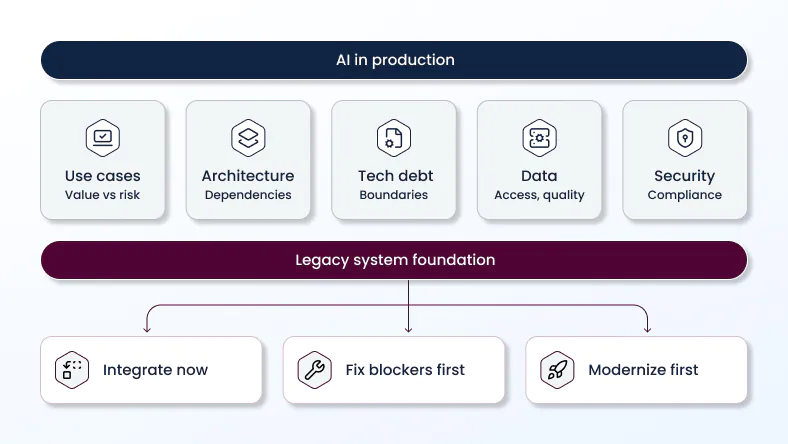
Five legacy traits turn promising pilots into stalled projects.
Tight coupling. Business logic, data access, and UI share one codebase. Changing one part to make room for AI touches everything else.
Technical debt. Undocumented workarounds, outdated libraries, and missing tests make every new integration slower and riskier.
Inaccessible data. Critical records sit in data silos, proprietary formats, or mainframe files with no API, so system interoperability breaks down before a model ever sees the data.
Fragile delivery. Manual releases, thin test coverage, and long change windows make it hard to ship AI features and even harder to roll them back.
Continuity requirements. Billing, claims, or order processing can’t go down while a team experiments.
This is why AI struggles with legacy system integration far more often than it struggles with model accuracy.
DORA confirms this in its State of AI-assisted Software Development report. AI truly acts as an amplifier: it amplifies what the system already has. If the system is weak, AI will cause it to fail more quickly. If it is robust, however, it will become even more robust.
For legacy environments, the lesson is practical. Before you add AI, find out what it will amplify.
See What a Legacy AI Readiness Assessment Covers
Every successful AI legacy system integration starts with one question: can this system safely support AI workloads, and if not, what has to change first?
The assessment should run before engineering budget is committed. It produces a prioritized list of use cases, blockers, and modernization boundaries. It’s also the clearest answer to how to prepare for AI in an older environment.
Identify High-Value, Low-Risk AI Use Cases
Start with the business problem, not the model. Make a list of potential AI use cases and look at each from two angles: how much value it could bring and how much risk it introduces in production.
Good starting points are usually use cases that read from legacy systems rather than write back to them. Document classification, anomaly detection in transaction logs, demand forecasting, and support ticket triage can all create value without changing critical records.
Use cases that write to systems of record, approve payments, or modify customer data should come later. First, make sure the integration points work and the right controls are in place.
For every use case, answer three simple questions: Which KPI should it improve? Who owns the process? And what happens when the AI gets it wrong?
Audit Legacy Architecture and Dependencies
Original documentation may be misleading. However, a system audit can set the record straight. An audit can be used to map out how an outdated program is functioning at the time of the audit.
It’s important to identify integration points, batch processing schedules, shared databases, architecture limitations and hard-coded dependencies. You also need to identify all consumers upstream and downstream in the chain. Also, pay attention to architectural constraints, such as synchronous calls that cannot tolerate additional delays, or components tied to specific hardware.
The map will show where AI can be integrated most safely and where system interaction will be complicated.
Map Technical Debt and Modernization Boundaries
A technical debt analysis tells you which debt blocks AI and which debt you can live with.
Not all debt matters. An ugly but stable reporting module may be fine. A monolithic order service with no tests, sitting exactly where AI needs to plug in, is a blocker.
Draw modernization boundaries explicitly. Decide which components will be modernized, which will be wrapped, and which will be left alone. This keeps the scope from drifting into a full rewrite.
Assess Data Readiness and Accessibility
In older environments, AI initiatives usually fail on data before they fail on models.
Check data quality, completeness, freshness, and lineage. Estimate the effort needed for data cleansing and data integration across silos. Confirm whether data is available in near real time or only through nightly exports.
Confirm ownership too. If no one is accountable for a dataset, no one will fix it when the model starts drifting.
Define Security, Compliance, and Continuity Requirements
Document the rules before engineering starts. Which data can leave the environment? Which regulations apply: GDPR, HIPAA, PCI DSS, SOX, or sector-specific rules? What audit evidence will you need?
Set continuity requirements as well. Define acceptable downtime, recovery time, and recovery point objectives for each affected service. These numbers shape every architecture decision that follows.
A formal risk assessment at this stage costs far less than a compliance finding after launch.
Choose AI Integration Architecture for Legacy Systems
The integration of legacy systems with artificial intelligence and machine learning rarely follows a single template. Choosing the optimal approach depends on the degree of interdependence, the availability of APIs, data migration, infrastructure constraints, and the level of implementation risk the company is willing to accept.
Our review of legacy modernization trends points the same way. Phased, pattern-based decisions consistently outperform all-at-once target architectures.
Below are the main ways to integrate AI with enterprise legacy systems and the conditions where each one fits.
APIs and Middleware for Accessible Legacy Systems
If the system already exposes reasonably stable APIs, this is the fastest path. AI services call existing endpoints, or middleware such as a message broker, an enterprise service bus, or an iPaaS routes data between the legacy application and AI components.
The trade-off: you’re subject to API limitations- such as request rate limits, missing fields, or slow responses – which aren’t suitable for real-time inference.
Robotic Process Automation (RPA) can fill small gaps where an API is missing. However, it should be viewed as a temporary measure. RPA scripts stop working when screen layouts change, so they should not be used to execute mission-critical AI workflows in the long term.
Strangler Pattern for Tightly Coupled Legacy Systems
The Strangler Fig Pattern replaces pieces of a monolith gradually. A routing layer sends specific requests to new, AI-enabled microservices while everything else still goes to the legacy system.
Pair it with an Anti-Corruption Layer. This translation layer keeps legacy data models and quirks from leaking into new AI services, so the new code stays clean.
Change Data Capture for Data-Heavy AI
When AI needs fresh operational data but the legacy database can’t handle extra query load, Change Data Capture is a strong option.
CDC reads changes from database logs and streams them to a data platform where models consume them. The source system sees almost no additional load, and AI works with near real-time data.
It fits fraud detection, predictive maintenance, personalization, and operational analytics. It doesn’t solve write-back. If AI must update the legacy system, you still need a controlled write path.
API Wrappers and Integration Layers When Modern APIs Are Unavailable
Many mainframe and client-server applications have no usable API. In that case, build a wrapper: a thin service that exposes legacy functions or data through a modern REST or event interface.
The wrapper becomes your stable integration boundary. AI services talk to the wrapper and never touch legacy internals directly.
Hybrid Cloud Deployment for Infrastructure Constraints
Some systems can’t move. Data residency rules, latency needs, or hardware dependencies keep them on premises.
A hybrid deployment involves storing sensitive data and performing core computing operations on on-premises resources, while model training or inference takes place in the cloud. The reverse is also possible: models are hosted on on-premises resources, while MLOps tools are hosted in the cloud. In either case, you need a secure connection, consistent identity management, and clear data flow rules.
When AI Integration Requires Legacy Modernization
Sometimes integration patterns aren’t enough. If every AI request has to pass through a component that is slow, unstable, or impossible to change, you have a modernization problem, not an integration problem.
Look out for the following signs: outdated interfaces that cannot provide the necessary data; components so tightly coupled that any change causes regressions; infrastructure that cannot support artificial intelligence workloads; and reliability issues that already threaten compliance with service level agreements (SLAs).
The answer is rarely a full rewrite. As our application modernization roadmap recommends, modernize in phases and only where constraints demand it.
Refactor Blocking Legacy Components First
Refactor the specific modules that sit in the AI integration path. Add tests, isolate business logic, and remove hidden dependencies.
Modernize APIs Before AI Integration
If APIs exist but are outdated, undocumented, or insecure, they should be modernized first. APIs with versioning, documentation, and proper authentication provide a reliable framework for artificial intelligence services to interact.
Our api modernization services start exactly here: stabilizing interfaces so new consumers, AI included, don’t break existing ones.
Replatform Infrastructure When AI Workloads Require It
AI workloads can need GPU capacity, elastic scaling, or container orchestration that legacy infrastructure can’t provide. Replatforming moves the application to modern infrastructure with limited code changes.
Do it when infrastructure is the real blocker, not as a default step. Data often needs the same treatment. Our data modernization services move data from legacy stores to platforms that can support AI pipelines. If the concept is new to your team, here’s what is data modernization in practical terms.
Re-Architect Only Where Constraints Demand It
Re-architecture is the most expensive option. Reserve it for components where coupling, scale, or reliability issues make every other path unworkable.
Even then, re-architect one domain at a time. Here’s an example of legacy modernization where a phased approach kept core operations running throughout.
How to Integrate AI With Legacy Systems
Once you know your constraints and architecture, the work shifts to execution. This is how to integrate AI applications into legacy enterprise systems while preserving operational continuity.
The six steps below reflect best practices for integrating AI into legacy systems at enterprise scale. They also answer the practical question of how to implement AI when downtime isn’t an option.
Step 1. Establish a Stable Integration Boundary
Be clear about where AI connects to the legacy system and how that connection works — whether through an API, a wrapper, an event stream, or a CDC pipeline. Agree upfront on the data format, acceptable latency, how errors will be handled, and who is responsible when something goes wrong.
Nothing on the AI side should go beyond these boundaries. This protects the legacy system and allows both sides to evolve independently of one another.
Step 2. Prepare and Govern Data for AI Workloads
Clean, label, and validate the data that the model will use. Set up a data governance system by identifying responsible parties, defining access rules, establishing quality assurance procedures, and implementing mechanisms to track data provenance.
Automate data quality checks as part of the processing pipeline. Poor-quality data should be identified before it enters the model, not after an incorrect prediction reaches the client.
Step 3. Validate AI Use Cases in a Pilot
Run pilot programs with a defined scope, a baseline, and success criteria tied to business KPIs. Decide in advance which result justifies scaling and which result means stopping.
Keep pilots close to production conditions. A pilot on a clean sample tells you little about how the model behaves on real legacy data.
Step 4. Test With Real Workflows Before Production Cutover
Test AI inside actual business workflows, with real users, real data volumes, and real edge cases.
Shadow mode deployment is especially useful here. The AI runs alongside the existing process and produces outputs, but those outputs don’t drive decisions yet. You compare results with the current process and fix issues with zero production impact.
Step 5. Deploy AI Incrementally Without Disrupting Core Operations
A phased deployment beats a big-bang release. Roll the AI out in stages and keep the first step small. Start with one region, one product line, or a limited share of traffic. This gives you room to see how it performs in the real world and fix issues before expanding.
Feature flags let you switch AI functionality on or off instantly without redeploying. Combined with canary releases, they turn each release into a controlled deployment, with any problem contained to a small group of users.
This is also where AI automation for legacy system integration pays off. Automated pipelines, tests, and monitoring remove much of the manual work that makes legacy releases slow and risky.
Step 6. Operationalize AI With MLOps and Release Controls
A model in a production environment is a dynamic component. MLOps encompasses model and data version management, automatic retraining, performance monitoring, and approval stages before new model versions are deployed to production.
Align AI release controls with your existing change management process, so model updates get the same review as any other production change.
Monitor data drift continuously. Legacy data shifts when business rules, upstream systems, or customer behavior change, and model accuracy quietly degrades with it.

Manage AI Integration Risks in Legacy Systems
Risk management for AI integration in legacy systems covers much more than model accuracy. It spans data exposure, dependency failures, compliance, and people. Treat it as an engineering requirement from day one.
Protect Sensitive Data and Control AI Access
Apply role-based access controls to both data and AI services. The model should see only the data its task requires.
Mask or tokenize personal and financial data where possible. If you use third-party AI software or external model APIs, confirm where data is processed, where it’s stored, and whether vendors retain it for training.
Maintain Backward Compatibility
Existing consumers of the legacy system must keep working. Version your APIs, keep old contracts alive during the transition, and run contract tests on every change.
Plan for Model, Integration, and System Failures
AI integration for legacy systems has to start from a blunt assumption: every layer will eventually fail. Models produce results with low reliability or incorrect results. Integrations time out. Legacy systems are taken offline for maintenance.
Develop a contingency plan for each of these scenarios: rule-based logic, queues for human review, cached results, or a smooth transition back to the process that existed before AI was implemented. Overload protection mechanisms prevent AI failures from spreading to core services.
Define Rollback and Recovery Controls
Every AI release requires a clear and well-defined rollback plan. You need to know exactly how to revert to the previous version of the model with just a few clicks, disable a malfunctioning feature, and clean up the data if the model produces a “hallucination” or an error.
A rollback should take just a few minutes, not turn into a weekend-long scramble.
Keep AI Decisions Traceable and Auditable
For important AI-driven decisions, keep a clear record of what went in, which model was used, what came out, and how confident the model was. Good model governance also means having clear rules around who approves models, how they’re documented, and how decisions can be explained to auditors or customers when needed.
Prevent AI-Induced Technical Debt
AI can make technical debt pile up quickly: one-off pipelines, duplicated logic, abandoned models, and custom glue code that nobody really owns.
The best way to avoid that is to keep things simple and consistent. Standardize your pipelines, reuse existing components where possible, and give every production model a clear owner. And treat AI like any other part of the system: it should go through the same architecture reviews, standards, and maintenance processes.
Manage Organizational and Operational Change
The technical side accounts for only 50% of success. Users need to know what the AI does, within what limits they can trust it, and how to override it.
Build change management into the process from the start: training, up-to-date runbooks, transparent escalation, and regular feedback from operations to the AI team. Support and on-call engineers must be prepared for AI-related incidents.
Measure Legacy AI Integration Performance and Value
Judging legacy system AI integration by model metrics alone misses the point. A highly accurate model that adds two seconds to a critical transaction can still be a net loss.
AI and Model Performance
Always measure accuracy, precision, and recall relative to how the system performed before AI was implemented. And be sure to include model confidence, data drift, and how often people have to correct the system’s errors in your charts.
System Reliability and Integration Performance
Keep an eye on the charts tracking integration delays, AI service uptime, interface errors, and the number of post-sales incidents. Our database must perform just as reliably as before – or even better. If its performance starts to decline, the entire operating system will grind to a halt.
Business Process and Time-to-Value Metrics
Look at cycle time, cost per transaction, throughput, and the revenue or margin impact of the affected process. Time to value, the gap between project start and measurable business impact, is usually the number executives care about most.
Engineering Productivity and Delivery Metrics
Keep track of the classic DORA metrics: how often we deploy, how many features make it to release, how often outages occur, and how long it takes to restore service after an outage. Also, include technical debt metrics for all relevant modules. If, after adding AI, delivery has slowed down and there are more outages, the problem isn’t with the model, but with the crumbling foundation.
Security, Compliance, and Adoption Metrics
Track access violations, audit results, and data incidents related to artificial intelligence components, and how often rollback plans had to be triggered. Regarding implementation, analyze the number of active users, feature usage, and user feedback. An artificial intelligence feature that no one uses is of no use, no matter how well it is implemented.
Where IT Consulting Supports Legacy AI Integration
Internal teams know the business logic better than anyone. External specialists close gaps in AI architecture, data engineering, and MLOps while your team keeps ownership of core systems and production decisions.
Moving AI Pilots Into Production
Consultants who have taken AI pilots into production know where things usually fall apart: monitoring isn’t in place, ownership is unclear, or an integration that worked with sample data doesn’t hold up in a real environment. They help build a realistic path to production from the start, rather than stopping at a working prototype.
Solving Integration Constraints Within Existing Environments
Experienced architects work with the technology you already have. They know how to find practical integration points across mainframes, legacy ERPs, and custom platforms without pushing a particular vendor or turning the project into a full-scale migration.
Maintaining Internal Ownership Through Deployment
A successful consulting project should make your team stronger, not dependent on outside help. Pair programming, collaborative documentation, and shared on-call duties help your engineers understand the solution and take ownership of it once the consultants have moved on.
Staff Augmentation for AI and MLOps Gaps
Sometimes the challenge isn’t strategy — it’s having enough people to get the work done. Staff augmentation brings ML engineers, data engineers, or MLOps specialists into your existing team. They work with your tools and processes and follow your technical direction, helping close the gap without disrupting how your team operates.
CHI Delivers AI Integration With Legacy Systems
CHI Software provides enterprise AI integration services for legacy systems by combining only the capabilities a project needs.
Software Modernization for AI-Blocked Legacy Systems
When legacy components block AI, our legacy software modernization services remove the specific constraints: refactoring blocking modules, modernizing interfaces, and replatforming where infrastructure falls short.
For product companies, product modernization consulting aligns modernization with the product roadmap. When phased change needs to reach further, our application modernization services cover complete applications.
AI Development for Legacy Products
Our AI and generative AI engineers build models, LLM-based assistants, and custom AI-driven system components that fit existing workflows. Through our ai transformation consulting services, we help select use cases where AI adds measurable value.
For teams that want engineers embedded directly with the business, we offer fde as a service. You can also hire forward deployed engineers for hands-on delivery inside your environment.
Data Engineering and MLOps for Production AI
We clear out messy data silos, connect real-time streaming pipelines, and build clean, reliable data platforms. From there, our DevOps and MLOps teams set up automated CI/CD workflows, live model monitoring, and guardrails so your AI models run smoothly in production. If you have legacy systems that can’t move to the cloud, our engineers will seamlessly bridge them with hybrid infrastructure.
IT Consulting for Phased Modernization Decisions
Trying to update everything at once rarely yields the desired results. We’ll help you clearly identify what should remain unchanged, what needs to be restructured, and in what order. You’ll receive a realistic, step-by-step action plan directly linked to key business performance indicators, with a clear division of responsibilities among teams and risk mitigation at every stage.
Conclusion
Any experiment that involves the terms “AI” and “legacy systems” cannot be successful. It must be viewed as a production engineering project. You are implementing AI into a legacy system – this is important and must live up to expectations.
As we’ve seen, the decision-making model itself is simple. You need to assess the environment. Choose an integration architecture (only one that will cause the least disruption to the system). Modernize only where the limitations of legacy systems require it. Testing effectiveness against real-world workflows is mandatory. If you see numbers changing, it’s easier to evaluate the results of AI implementation.
Connecting the model is just the tip of the iceberg. The easiest part. But the stability of core services, the management of technical debt, and the accountability of engineers in your company – these are the true indicators. These factors determine whether AI will deliver value for years to come or become just another unstable cog in your system.
FAQs
-
How Does AI Integration Differ From Legacy Modernization?

AI integration connects AI capabilities to an existing system through APIs, wrappers, or data pipelines, leaving the core largely unchanged. Legacy modernization changes the system itself through refactoring, replatforming, or re-architecture. Many projects need both, but modernization should be limited to the components that block AI in production.
-
What Teams Should Be Involved in Legacy System AI Integration?
You need the engineering owners of the legacy system, data engineers, ML engineers, DevOps or MLOps specialists, security and compliance, and business process owners.
-
Which Legacy Systems Are Hardest to Integrate With AI?
AI integration in legacy systems is most difficult when applications lack APIs, rely on shared databases, have little test coverage, or run on unsupported infrastructure. Mainframes, tightly coupled monoliths, and heavily customized ERP platforms are usually the most challenging.
-
How Long Does Legacy System AI Integration Take?
A readiness assessment usually takes a few weeks. A focused pilot often runs two to three months. Production rollout in complex environments can take six to twelve months or longer, depending on data readiness, the scope of modernization, and compliance review cycles.
-
What Data Is Needed Before Legacy System AI Integration?
You need accessible, reasonably clean historical data for the target use case, with known owners and lineage. You also need a reliable path to current operational data through APIs, CDC, or scheduled pipelines, plus clear rules on what data AI can access and where it can be processed.
About the author
Yana oversees relationships between departments and defines strategies to achieve company goals. She focuses on project planning, coordinating the IT project lifecycle, and leading the development process. In their role, she ensures accurate risk assessment and management, with business analysis playing a key part in proposals and contract negotiations.
Rate this article
27 ratings, average: 4.8 out of 5